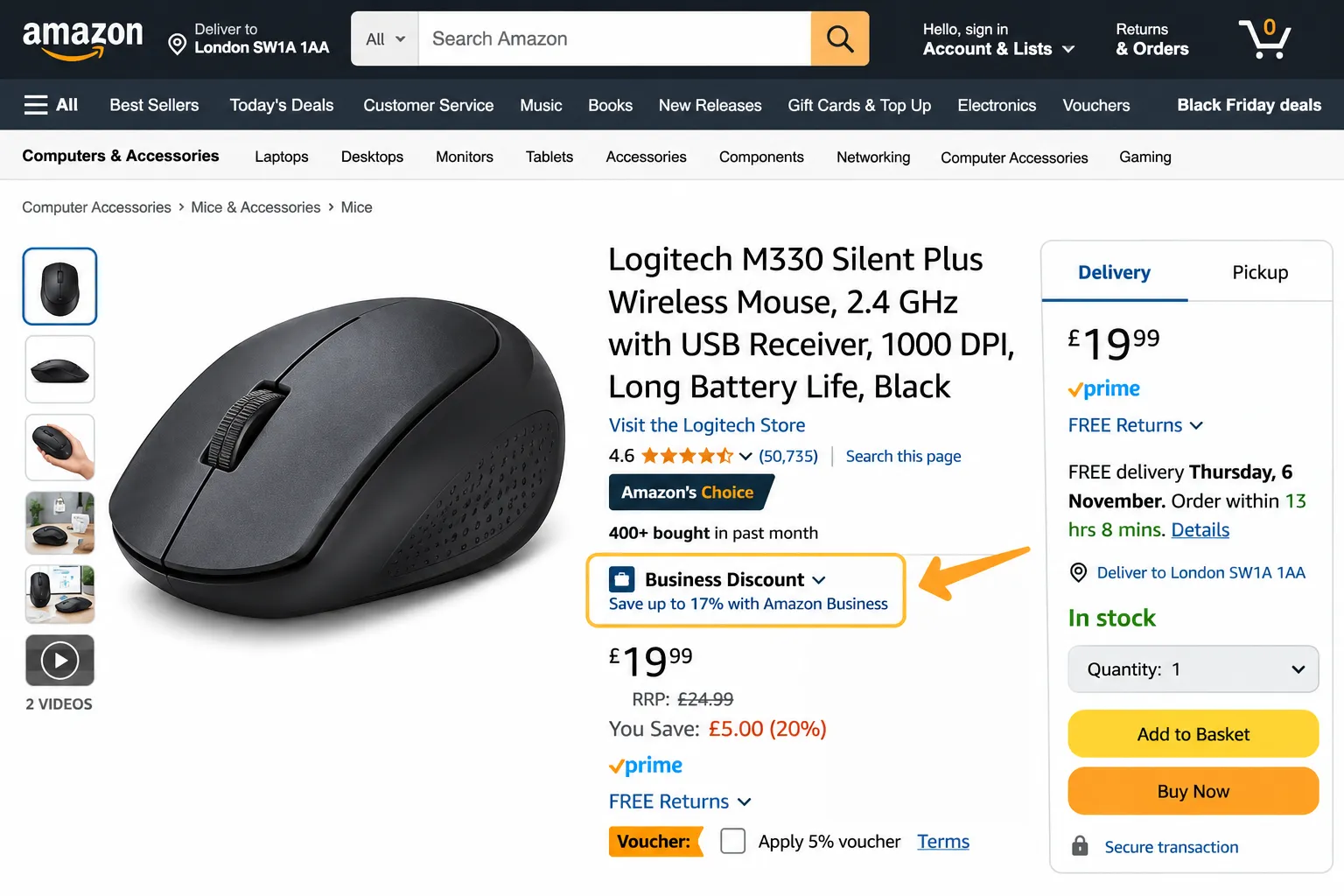
Amazon is rolling out a new Amazon Business Discount badge, and it could change how business buyers see your offers. If your business price is low enough against a validated reference price, Amazon will show a badge, a strikethrough price and a savings percentage automatically. No extra application is needed.
For sellers who already use Amazon Business pricing, this is a chance to get always-on visibility with organisations that buy in bulk and want to cut spend. For sellers who have ignored B2B so far, it is a good reason to start.
In this update, the EcomRanker team explains what the badge is, how it works, what changes for the old Business Savings Blue Badge, and what you should do this week.
What Is the Amazon Business Discount Badge?
The Business Discount badge is a new visual marker on Amazon Business. It appears on your single-unit business price when that price beats a validated reference price (VRP) by a set margin. Amazon shows it in search results and on product detail pages, next to a strikethrough price and the percentage saved.
Think of it as an always-on deal badge for qualifying B2B offers. Business buyers scanning dozens of listings can spot your discount at a glance, without clicking in.
According to Amazon, B2B sales of products with business pricing grew at nearly double the rate of products without it in 2026. That is a strong signal that business buyers respond to visible, competitive pricing.
How the New Badge Works
Here are the rules that matter:
- Badge threshold: your single-unit business price must offer at least 5% savings against the validated reference price.
- Strikethrough threshold: at 2% savings or more, your offer shows strikethrough pricing in search results, and strikethrough pricing with the savings shown in red on the detail page.
- VRP required: if your product has no validated reference price, the badge, strikethrough and savings will not display.
- No star rating needed: products no longer need a 4-star rating to qualify for this badge.
- Automatic: once your price meets the threshold, the badge is earned without any extra setup.
- New price block: the badge and savings percentage appear prominently in red alongside the strikethrough price.
What Happens to the Business Savings Blue Badge?
The new badge replaces the legacy Business Savings Blue Badge (BSBB) for single-unit business prices. Quantity discounts are not affected. Offers with at least a 3% discount on the first tier (the lowest quantity level in your discount structure) and a 4-star rating will keep earning the Business Savings Blue Badge as before.
In short, there are now two routes to B2B visibility:
| Route | What triggers it | Star rating needed |
| Business Discount badge | Single-unit business price at least 5% below the VRP | No |
| Business Savings Blue Badge | Quantity discount of at least 3% on the first tier | Yes, 4 stars |
Why This Matters for Amazon Sellers
1. It removes a barrier. Many newer or smaller brands were shut out of the old badge because of rating requirements. Now price and a valid reference price do the work.
2. It improves click-through. A red savings percentage and strikethrough price make an offer stand out in a crowded results page, which helps buyers pick you first.
3. It targets high-value buyers. Business customers often order repeatedly and in larger volumes. Winning them can lift lifetime value well beyond a single order.
4. It rewards disciplined pricing. Sellers who plan their B2B price points deliberately will gain more than those who simply slash prices.
How to Set Your Business Price in Seller Central
- Log in to Seller Central and open Manage All Inventory.
- Find the product you want to price for business buyers.
- Add a business price for the single unit, and, if relevant, set quantity discount tiers.
- Save your changes and monitor the listing to see whether the badge and strikethrough appear.
Amazon also publishes step-by-step help called “Set a business price or quantity discount” inside Seller Central if you want its official walkthrough.
Best Practices to Qualify and Stay Profitable
Check your margins first. A 5% gap against the VRP is only worth it if the sale still makes money after Amazon fees, shipping and ad costs. Run the numbers per ASIN before changing any price.
Prioritise the right products. Start with consumables, office and workplace supplies, and repeat-purchase items where business buyers order often. Fast movers with healthy margins are the best candidates.
Combine single-unit and quantity pricing. Use a single-unit business price to earn the new badge, and a quantity discount tier to keep the Business Savings Blue Badge where your rating allows. Together they give buyers a clear reason to order more.
Protect your reference price. Because a validated reference price must exist for the badge to display, keep your listing data, pricing history and consumer price consistent. Wild price swings can make it harder to hold a stable discount.
Support the badge with advertising. A badge helps conversion, but buyers must first find you. Pair your B2B pricing with well-structured Amazon PPC management and, for wider reach, consider Amazon DSP to retarget business audiences.
Think about subscriptions and bulk. If your products suit repeat orders, look at Amazon Subscribe & Save alongside your business pricing. If you supply retailers and resellers, our guide on how to sell wholesale on Amazon explains the model in detail.
Common Mistakes to Avoid
- Discounting too deeply and wiping out your margin.
- Assuming the badge appears instantly, when it depends on a validated reference price existing.
- Ignoring quantity discounts, which still drive larger orders.
- Setting a business price once and never reviewing it as costs and competitor prices move.
- Treating B2B as separate from your wider advertising plan.
What Should Sellers Do Now?
- Audit your catalogue and list products with real B2B demand.
- Calculate the lowest business price you can offer while staying profitable.
- Set single-unit business prices that meet the 5% threshold where it makes sense.
- Add quantity discount tiers for bulk buyers.
- Track visibility, conversion and order size on those ASINs over the next few weeks.
Amazon has said the badge is arriving soon, so the sellers who prepare now will be first in line when it goes live.
Frequently Asked Questions
[post_faqs]
Need Help Winning on Amazon Business?
EcomRanker is a full-service Amazon agency working across the UK, USA, UAE and India. From pricing strategy to Amazon advertising management services, our team can help you turn new features like the Business Discount badge into real revenue. See our guide to the top Amazon advertising agencies to compare options, or talk to our team for a free account review.