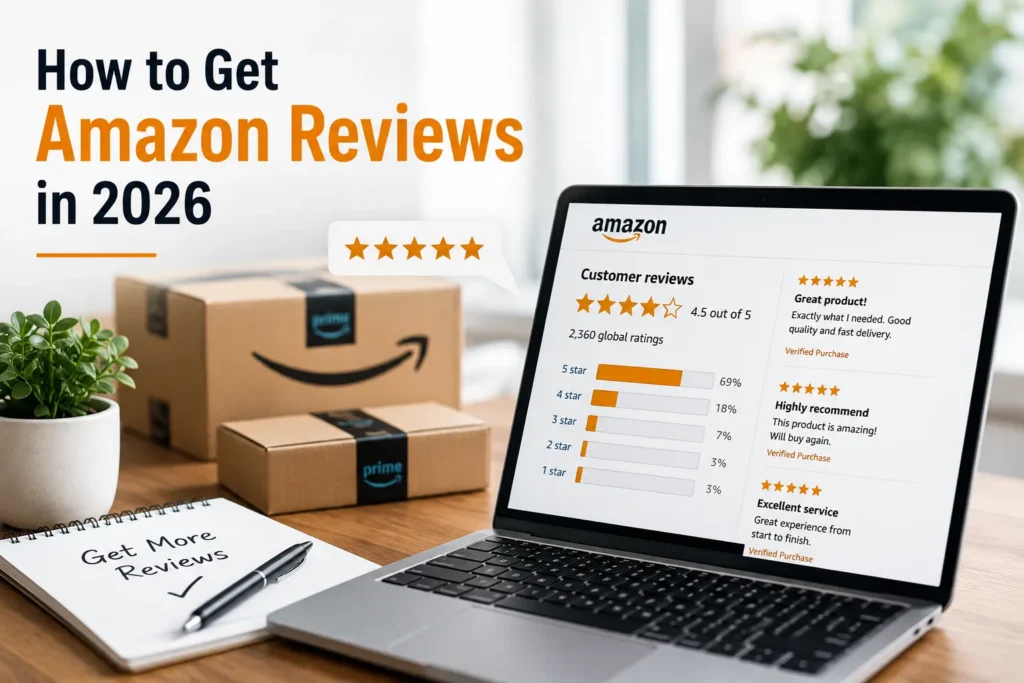
Reviews are still the single biggest lever most Amazon sellers have over conversion rate, and by extension over organic rank. A listing with a 4.6-star rating and 200 reviews will consistently outsell an identical product sitting at 3.8 stars with 12 reviews — even when the underlying product is the same. The challenge is that Amazon has spent the last several years closing every shortcut that used to make reviews easy to manufacture, which means the sellers who win the review game in 2026 are the ones running a repeatable, compliant system rather than chasing one-off hacks.
This guide covers every white-hat tactic worth using right now, how Amazon actually calculates your star rating behind the scenes, the grey- and black-hat tactics you’ll see other sellers use (and why they’re a bad trade), and what to do when a review needs to come down.
Ratings vs. Reviews: What You’re Actually Optimizing For
Since 2020, Amazon has let customers submit a star rating with no written text attached. That single change made leaving feedback dramatically easier, and it’s why the vast majority of the stars on any listing today are ratings-only rather than full written reviews. Both feed into the same overall star average, but only written reviews display as readable text on the product page — so a healthy review strategy needs to produce both volume (ratings) and substance (written reviews with detail, since those carry more weight in Amazon’s algorithm and do more to convince a hesitant buyer).
How Amazon Actually Calculates Your Star Rating
Amazon doesn’t display a simple arithmetic mean of your star ratings — it runs a weighted-average model that most experienced sellers only partially understand. Amazon has never published the exact formula, but based on years of pattern observation across thousands of listings, the following variables consistently influence how much weight an individual rating carries:
- Review recency — newer reviews are weighted more heavily than old ones, which is why a rating can shift even without new reviews if enough old ones age out of relevance.
- Reviewer credibility — accounts with a longer history of detailed, helpful reviews carry more influence than brand-new or single-review accounts.
- Verified vs. non-verified purchase — verified purchases are trusted more and weighted accordingly.
- Review length and helpful votes — a detailed review that other shoppers mark as helpful outweighs a one-line rating.
- Deviation from the mean — an outlier rating (very high or very low relative to the norm for that product) may be dampened in the weighting.
The practical takeaway: it’s not enough to get five-star ratings — you want reviews from established accounts, ideally with some written detail, arriving on a steady cadence rather than in a single suspicious burst.
15 White-Hat Ways to Get Amazon Reviews
1. Enroll Eligible Products in Amazon Vine
Vine remains the fastest fully-compliant path to your first reviews. Any parent ASIN with fewer than 30 reviews can be enrolled through the Advertising menu in Seller Central; you provide free units to Vine Voices (experienced, vetted reviewers), and Amazon handles the rest. Expect Vine feedback to run somewhat more critical than average — Vine reviewers are detail-oriented by design — but for a listing with zero social proof, a handful of honest reviews within a few weeks is worth the trade-off.
2. Automate the Request a Review Button
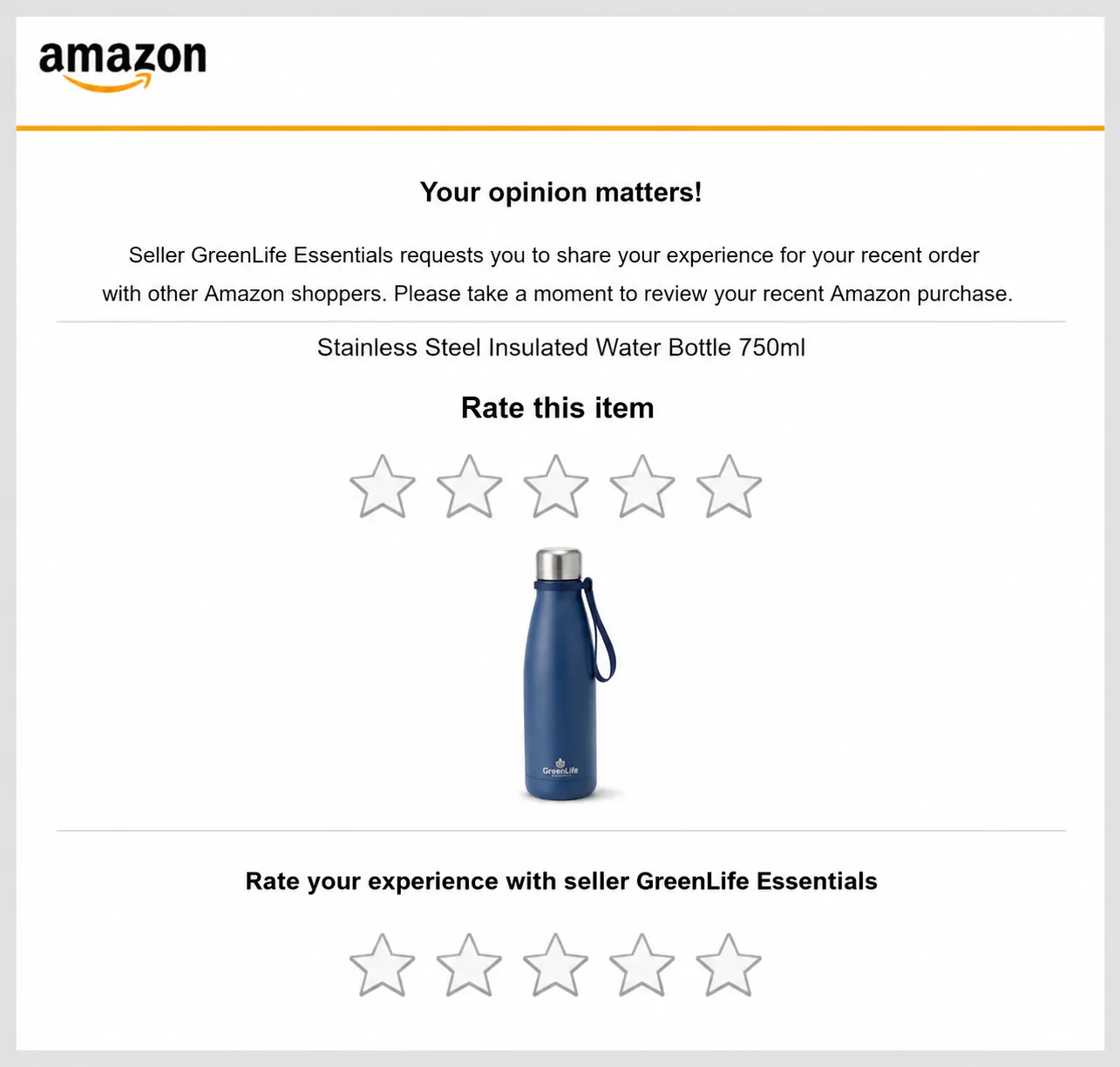
Amazon’s built-in Request a Review feature sends its own standardized rating-and-feedback request on orders 4-30 days after delivery. It can’t be customized and it bundles the product rating request with a seller feedback request in the same email — but because it comes from Amazon rather than the seller, response rates consistently beat seller-sent alternatives. Manually clicking this on every order doesn’t scale past a handful of daily orders, which is where a review-automation tool or a well-structured PPC and account management workflow that includes automated review requests earns its keep.
3. Build a Compliant Post-Purchase Email Sequence
A short, well-timed email sequence — order confirmation, delivery check-in, and a review nudge roughly a week after delivery — consistently outperforms a single generic ask. The key compliance rule: never ask for a positive review, never offer anything contingent on leaving one, and never bundle the ask with a discount code. Frame it as “we’d love your feedback” rather than “please leave us 5 stars.”
4. Use Product Inserts the Right Way
Amazon has repeatedly warned sellers against inserts that ask for a positive review or that promise anything (an extended warranty, a bonus item, a refund) in exchange for one. The safer and, frankly, more effective use of an insert is to drive customers into a warranty registration or support contact flow that captures their email, so you can follow up later with a neutral review reminder rather than baking the ask directly into the packaging.
5. Get Packaging Right
Packaging is the first physical touchpoint a customer has with your brand, and it colors everything that follows. Poly bags, generic brown boxes, and missing instructions all read as “cheap” even when the product itself is well made — and that impression shows up in review text. Full-color retail packaging, a clear instruction insert (even for simple products), and careful cushioning to prevent in-transit damage all reduce the fulfillment-related complaints that drag down an otherwise good product’s rating.
6. Price Aggressively at Launch
A meaningful launch discount does two things: it drives the sales velocity Amazon’s algorithm rewards, and it lowers the bar for a first-time buyer to take a chance on an unproven listing. More sales at launch means more opportunities for reviews to accumulate, even without touching the request-for-review process at all.
7. Launch New Products to Your Owned Email List
If you’re building an email list off-Amazon, send new-product launches to your Amazon listing directly rather than to your own website. This does two things: it produces the sales velocity spike Amazon rewards, and it puts the product in front of an audience that already likes your brand — which correlates strongly with positive review sentiment. This tactic works best alongside a broader brand-building and PPC strategy rather than as a one-off launch tactic.
8. Mine Your Seller Feedback for Review Candidates
Most buyers don’t understand the difference between seller feedback and a product review, so a meaningful share of “reviews” you’d want actually show up in your Seller Feedback tab instead. Reviewing this section regularly and proactively (and compliantly) reaching out to customers who left positive seller feedback — especially those who mentioned the product itself — is one of the highest-conversion review sources available, because these customers have already signaled satisfaction.
9. Use the Buyer-Seller Messaging Feature to Contact Critical Reviewers
Brand-registered sellers can initiate contact with customers who left a rating of 3 stars or below. Amazon sends a standardized message first, and you can only send a custom response once the customer replies — there’s no guarantee of a revised review, but resolving the underlying issue (a defect, a missing part, confusion about use) sometimes results in the customer updating their rating voluntarily. This ties directly into a broader listing optimization process — recurring complaints in reviews are often the clearest signal of what to fix in your bullet points, images, or product itself.
10. Turn Real Customer Service Interactions Into Reviews
Genuine, human customer service — answering a pre-purchase question, resolving a return, helping a confused buyer — builds enough goodwill that most customers will happily leave a review if you simply ask at the end of the conversation. This only works with real engagement, not an automated “how was your order?” template; the ask should come after the customer confirms they’re satisfied, not before.
11. Run Sponsored Ads to Increase Overall Sales Volume
Reviews are ultimately a function of orders — the more qualified traffic converting into sales, the more review opportunities exist across every channel above. A well-run Amazon PPC management program that keeps ACOS and TACOS in a healthy range compounds every other tactic on this list, because it’s driving the order volume that feeds Vine, the Request a Review button, and your email sequence.
12. Run Brand-Tailored Promotions for Repeat Customers
Amazon’s segmented promotion tools let brand-registered sellers target specific audiences — repeat customers, cart abandoners, or high-spend buyers — with discounts that drive both incremental sales and, indirectly, more review volume from an audience already familiar with the brand. See our guide to Amazon Brand Tailored Promotions for a full setup walkthrough.
13. Keep Your Catalog Data Clean
A surprising share of one- and two-star reviews trace back to catalog problems rather than product problems — a duplicate or mismatched barcode causing the wrong item to ship, a parent-child variation mapping error, or an outdated title that no longer reflects what’s in the box after Amazon’s 2026 title-length changes. Cleaning up ASIN and SKU structure and confirming UPC to GS1 barcode compliance removes an entire category of avoidable negative reviews before they happen.
14. Fix Fulfillment Issues Before They Become Reviews
Late deliveries, damaged-in-transit items, and lost inventory routinely show up as one-star reviews even though they’re Amazon’s fault, not the product’s. Staying on top of FBA reimbursement claims and monitoring performance across your fulfillment center network won’t stop every fulfillment-related complaint, but it does mean you catch and can request removal of reviews that are purely about shipping, not the product.
15. Build the System Once, Then Let It Run
The sellers with consistently strong review counts aren’t doing anything more clever than everyone else — they’ve simply turned Vine enrollment, Request a Review automation, seller-feedback mining, and post-purchase email into a standing process rather than a launch-week sprint. If this isn’t something your team has bandwidth to run consistently, it’s one of the areas covered in our Amazon seller coaching and account management programs.
What Not to Do: Grey- and Black-Hat Review Tactics
You’ll encounter sellers — and services actively marketing to sellers — using tactics that push well past Amazon’s Terms of Service. Understanding what they are isn’t an endorsement; it’s context for why Amazon’s enforcement has gotten so aggressive, and why the risk-adjusted return on these tactics has gotten worse every year.
Friends and Family Reviews
Asking a friend or relative to leave a review is technically against Amazon’s TOS, and Amazon is increasingly good at detecting the connection through shared shipping addresses, devices, or payment methods. Low volume tends to fly under the radar; the exposure grows with every additional review from a connected account.
Off-Amazon Review-for-Refund Groups
Facebook and Discord groups that exchange free or discounted products for reviews, with a refund issued after the review posts, are one of the most commonly cited grounds for account suspension. The exchange happens off-Amazon, which makes it harder to trace directly, but a single customer messaging Amazon about an unpaid refund is enough to trigger an investigation.
Email-Append Services
Services that match Amazon shipping data against third-party databases to obtain a customer’s real email address operate in a grey area — using the resulting list for direct outreach carries meaningful account risk, though using it for retargeting on other ad platforms is comparatively lower-risk.
Brushing and Fake-Review Networks
Networks of fake or compromised buyer accounts that purchase a product and leave a review at scale represent the highest-risk tactic on this list, and Amazon’s fraud detection has specifically targeted this pattern for several years running. Accounts caught using these networks face account-level suspension, not just review removal.
How to Get an Unfair Negative Review Removed
Amazon will remove reviews in a specific, narrow set of circumstances — it’s worth knowing what qualifies before opening a case in Seller Central:
- Reviews containing offensive language, profanity, or content unrelated to the product.
- Reviews that include a URL, phone number, or other personal contact information.
- Reviews that are purely about fulfillment (late delivery, packaging damage in transit) on an item fulfilled by Amazon, rather than about the product itself.
To request removal, open a case in Seller Central, link directly to the review, and state clearly which of the above grounds applies. Amazon rejects the majority of removal requests that are simply “this review is negative” without one of these specific violations attached.
Frequently Asked Questions
Is it legal to ask customers for an Amazon review?
Yes. Amazon allows sellers to request a review as long as the request doesn’t ask for a positive review, offer compensation, or apply pressure. Neutral requests — through the Request a Review button, compliant email follow-ups, or product inserts — are fully within Amazon’s Terms of Service.
How many reviews does a new Amazon listing need to rank?
There’s no official number, but most experienced sellers treat 15-25 reviews with a 4.3+ average as the point where conversion rate stabilizes and the listing starts competing normally in search. Fewer than 10 reviews is where buyers hesitate most.
What’s the fastest way to get reviews on a brand-new ASIN?
Amazon Vine is the fastest compliant option for listings with fewer than 30 reviews, typically producing the first handful of reviews within 2-4 weeks of enrollment. Pairing Vine with the Request a Review button and a clean post-purchase email sequence covers both the first wave and the ongoing baseline.
Can I offer a discount or refund in exchange for a review?
No. Any exchange — discounted units, free products, refunds, or gift cards contingent on leaving a review — violates Amazon’s Community Guidelines, whether it happens on Amazon, by email, or on a third-party platform. Amazon actively cross-references off-Amazon groups and email trails to detect this.
Why did Amazon remove one of my reviews?
The most common triggers are: the review was left by an account linked to the seller (shared address, device, or payment method), it referenced an incentive, it contained prohibited content (profanity, competitor mentions, contact information), or Amazon’s fraud detection flagged an unnatural pattern across many reviews at once.
Can I get a negative review removed?
Sometimes. Reviews containing offensive language, personal information, or claims that are clearly about fulfillment (late delivery, damaged-in-transit) rather than the product itself can be reported through Seller Central and are removed at Amazon’s discretion. Amazon rarely removes a review purely because it’s negative but factually about the product.
What is the Request a Review button and does it actually work?
It’s a built-in Seller Central and API feature that sends Amazon’s own standardized request for a product rating and seller feedback in a single message, usable on orders 4-30 days after delivery. It can’t be customized, but because it comes from Amazon rather than the seller, open and conversion rates are typically higher than seller-sent emails.
Does Amazon Vine hurt my rating?
Vine reviewers are instructed to review honestly, and because they’re experienced, detail-oriented reviewers, Vine feedback tends to be more critical than average buyer feedback. It’s common to see a slightly lower average from a Vine batch — that’s a trade-off for getting reviews quickly on a listing with none.
Can I contact a customer who left a negative review?
If you’re Brand Registered, Amazon lets you initiate contact with reviewers who left a rating of 3 stars or below, through a standardized channel. You can’t send a custom message until the customer responds first, and there’s no guarantee they’ll revise the review, but it opens a path to resolve the underlying issue.
Do product inserts still work for getting reviews?
They still help, but only as a neutral reminder — Amazon has repeatedly warned sellers against inserts that request a positive review or offer anything in exchange. The more effective approach is using an insert to build a first-party relationship (warranty registration, support contact) rather than asking for a review directly.
How much does Amazon Vine cost in 2026?
Vine enrollment carries a flat per-parent-ASIN fee, payable through Seller Central at the time of enrollment, on top of the units you provide free to Vine reviewers. Pricing has changed more than once since Vine opened to all sellers in 2019, so confirm the current fee in Seller Central’s Advertising menu before budgeting.
What’s the difference between a rating and a review on Amazon?
Since 2020, Amazon has allowed customers to leave a star rating without writing any text. Both count toward your product’s overall star average, but only written reviews display as text on the listing page. Ratings-only feedback is far more common because it takes seconds to leave.
Should I use a third-party review automation tool?
Tools that automate the built-in Request a Review button (rather than sending custom seller emails) are TOS-compliant and save time on manual clicking. Be cautious of any tool or service that promises reviews in exchange for free products, discounts, or refunds — that’s the part that carries suspension risk, not the automation itself.
How long does it take to build a solid review base from zero?
For a typical new listing running Vine plus a compliant Request a Review workflow, most sellers see 15-30 reviews within the first 60-90 days, depending on sales velocity. Low-velocity categories can take considerably longer without additional traffic from PPC or an owned audience.
Can bad packaging cause bad reviews even if the product is fine?
Yes — packaging is the customer’s first physical interaction with the brand, and damage, flimsy materials, or a confusing unboxing experience get blamed on the product itself even when the item works perfectly. Sellers who invest in full-color retail packaging and clear instructions consistently see fewer product-quality complaints in their reviews.
Build a Review Engine, Not a One-Time Push
The listings that hold a strong star rating over years, not just at launch, are the ones where review generation is baked into the standard operating process — Vine on new launches, Request a Review automation running on every eligible order, seller feedback reviewed weekly, and catalog or fulfillment issues fixed before they turn into one-star reviews. If you’d rather have that system built and run for you, our team handles review strategy as part of full Amazon account management and PPC services for sellers across the UK, US, UAE, and India.