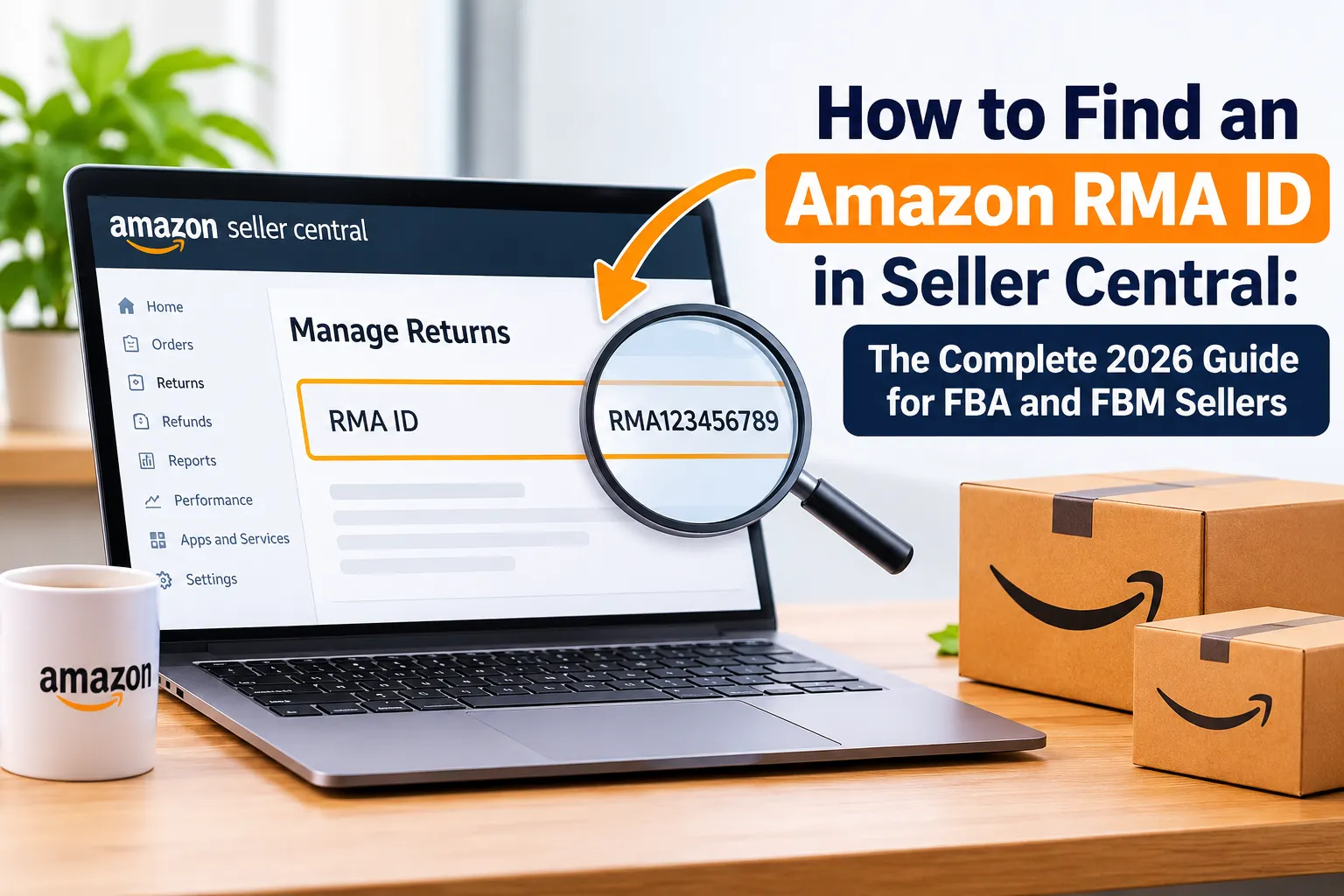

Quick answer: To find an Amazon RMA ID for a seller-fulfilled return, open Seller Central, go to Orders > Manage Returns, set the search filter to RMA ID, paste the number and search. If it does not appear, widen the date range or download the Return Reports file and search the Amazon RMA ID column to find the matching order. For FBA returns, use Reports > Fulfillment > Customer Concessions > FBA Customer Returns and search by order ID or license plate number (LPN).
Every Amazon seller eventually opens a returned package and finds nothing inside to explain it. No packing slip, no order number, no note, just a shipping label with a barcode and a string of digits. That string is usually the Amazon RMA ID, and it is the fastest way to work out which customer sent the package, which order it belongs to and how much you should have refunded.
Yet many sellers do not know what an RMA ID is, where to search for it, or what to do when it will not show up. The result is delayed refunds, mismatched inventory, denied SAFE-T claims and money quietly lost on returns that nobody reconciled.
This guide fixes that. It explains what an Amazon RMA ID is, shows six ways to look it up in Seller Central (for both FBM and FBA), walks through the “mystery package” workflow, covers authorisation and custom RMA numbers, and gives you a returns-tracking system you can copy. We also cover the problems that cost sellers the most money, plus a Q4 checklist for the holiday returns wave. It is written by the team at EcomRanker, an Amazon-first ecommerce growth agency that works with sellers on advertising, listings and account operations.
| Key takeaways An Amazon RMA ID identifies a single return request. It is not the order ID, and it is not the FBA license plate number (LPN). FBM sellers search RMA IDs in Manage Returns or download the Return Reports file. FBA sellers rely on the FBA Customer Returns report, using order ID, SKU, ASIN or LPN. If a search fails, widen the date range, check the marketplace and fulfillment type, and clean the pasted ID before assuming the return does not exist. Photograph every return label before opening the box, and log the RMA ID, order ID, condition and refund status in one shared tracker. Return reasons are free market research. Feeding them back into listings and ad strategy lowers both return rates and wasted ad spend. |
In this guide
- What Is an Amazon RMA ID?
- Why the RMA ID Matters for Sellers
- FBA vs FBM: Which Return Process Do You Have?
- How to Find an Amazon RMA ID in Seller Central (6 Methods)
- What to Do When You Cannot Find the RMA ID
- Step-by-Step: Handling a Mystery Return With No Order Details
- How to Authorize Returns and Create a Custom RMA Number
- Common Amazon RMA ID Problems and How to Fix Them
- Best Practices for Managing Amazon RMA IDs
- Preparing for Q4 and Holiday Returns
- Turn Return Data Into Better Listings and Smarter PPC
- Manual Tracking vs Tools vs Outsourcing
- How EcomRanker Can Help
- FAQs About Amazon RMA IDs
What Is an Amazon RMA ID?
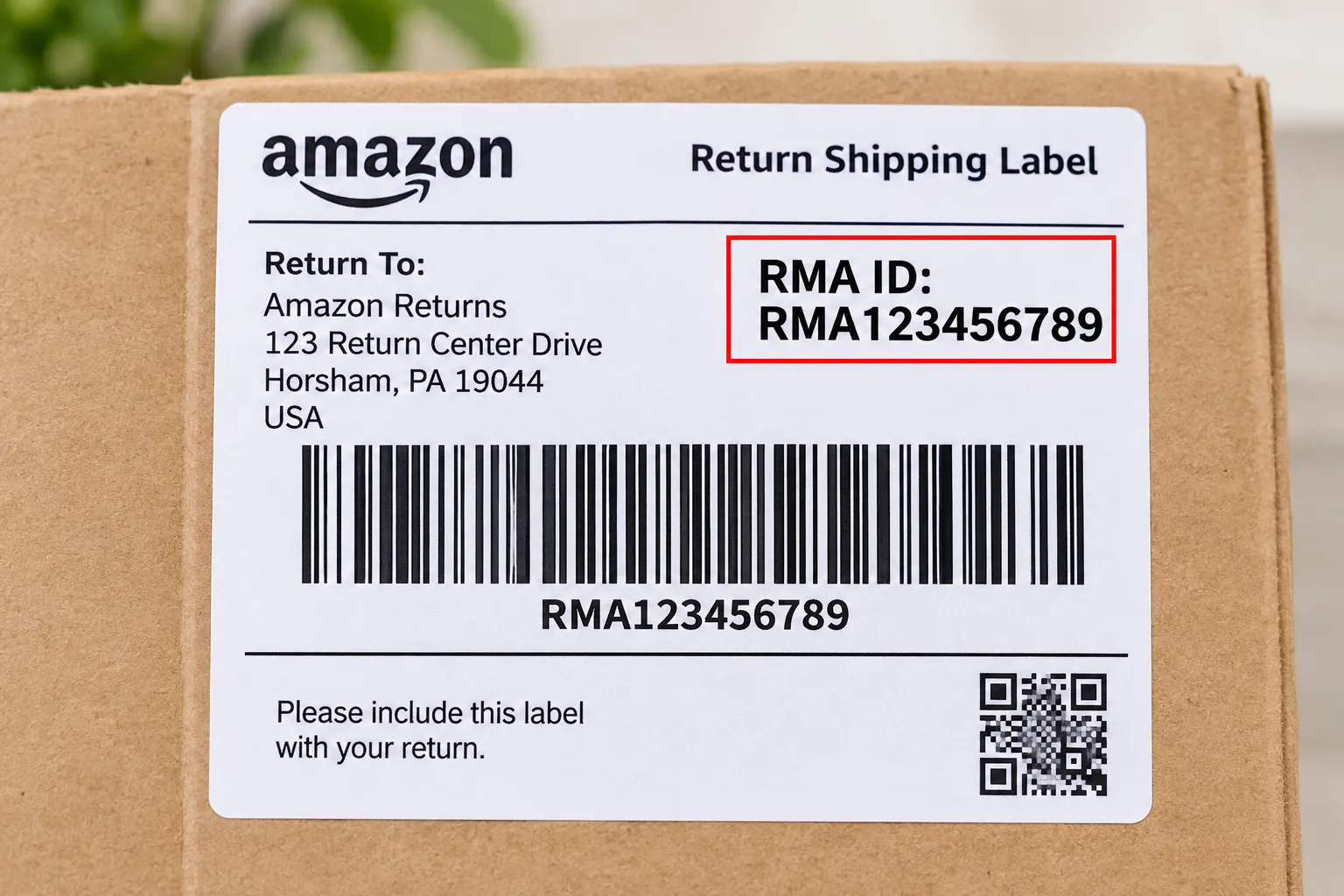
An Amazon RMA ID is the unique identifier attached to one return request. RMA stands for Return Merchandise Authorization, the standard retail term for approval to send an item back. When a customer starts a return and the request is approved, either automatically under Amazon’s return policy or manually by the seller, a return authorization is created and given its own reference. That reference is the RMA ID, also called the RMA number or return authorization number.
The ID normally appears in several places: on the return shipping label (often next to or beneath a barcode), on the return authorization slip the customer may print, in the customer’s return confirmation, and in your Seller Central return details. Because the same reference appears on both the package and in your account, it is the bridge between a physical box on your desk and a digital record in your dashboard.
Formats vary, so do not rely on a fixed pattern. Some sellers see a short alphanumeric code, others see a long numeric string. What matters is that you copy it exactly, with no leading or trailing spaces, because a single wrong character will make the search return nothing.
RMA ID vs Order ID vs LPN vs Tracking Number
Sellers often mix these four identifiers up, which is why searches fail. Each one answers a different question:
| Identifier | What it identifies | Where you will use it |
| RMA ID | One return request against an order | Manage Returns search, Return Reports, SAFE-T and refund disputes |
| Order ID | The original purchase (format 123-1234567-1234567) | Order search, refunds, A-to-z claims, accounting |
| LPN (license plate number) | A single returned unit scanned at an Amazon fulfillment center | FBA Customer Returns report, reimbursement cases |
| Return tracking number | The carrier shipment carrying the return | Carrier tracking, lost-in-transit disputes |
A useful rule: the RMA ID tells you which return, the order ID tells you which purchase, the LPN tells you which physical unit Amazon received, and the tracking number tells you where the box is. Keep all four in your log whenever you have them.
Why the RMA ID Matters for Sellers
It is tempting to treat the RMA ID as a minor detail, but it sits at the centre of nearly every returns task. Here is where it earns its place.
- Matching returns to orders. When a package arrives without paperwork, the RMA ID is often your only clue. Matching it to the order tells you the customer, the product, the price and the refund status.
- Accurate refunds. Refunding the wrong order, or refunding twice, is a direct profit leak. A confirmed RMA-to-order match prevents both.
- Inventory accuracy. Knowing which returns were received, inspected and restocked keeps your stock counts and cost-of-goods records honest.
- Dispute and claim evidence. SAFE-T claims, damage disputes and A-to-z responses are far stronger when they reference the RMA ID alongside photos and carrier data.
- Spotting abuse and patterns. Repeated wrong-item or used-item returns, or a spike on one ASIN, only become visible when returns are logged by RMA and reason.
- Audit trail. If Amazon, your accountant or a customer questions a refund months later, an RMA-based record settles the question quickly.
Returns are also expensive in ways that are easy to overlook: the refund, outbound and return shipping, handling time, unsellable stock and the opportunity cost of inventory sitting unavailable. A disciplined RMA process will not eliminate returns, but it stops the avoidable losses that happen between the box arriving and the refund being closed out.
FBA vs FBM: Which Return Process Do You Have?
Before you search for anything, confirm who fulfilled the order, because Seller Central tracks returns differently for each model. Searching the wrong place is the single most common reason sellers think an RMA ID “does not exist.”
| FBM (seller-fulfilled) | FBA (fulfilled by Amazon) | |
| Who receives the return | You, at your return address | Amazon, at a fulfillment center |
| Where to look in Seller Central | Orders > Manage Returns; Reports > Return Reports | Reports > Fulfillment > Customer Concessions > FBA Customer Returns |
| Main identifiers | RMA ID, order ID, return tracking number | Order ID, SKU/ASIN, LPN, disposition |
| Who authorises and refunds | Amazon auto-authorises most in-policy US requests; you manage the rest and refund after receipt | Amazon handles authorisation, refund and inspection |
| Your main risk | Refunds issued before arrival, wrong or used items, lost returns | Returns never received, wrongly graded condition, missing reimbursement |
If you sell both ways, use both sets of tools. Many brands run FBA for core ASINs and FBM for bulky, seasonal or low-volume items, which means two parallel returns workflows that still need a single log.
How to Find an Amazon RMA ID in Seller Central (6 Methods)
Seller Central’s layout and labels change periodically, so treat the menu paths below as a reliable guide rather than an exact script. If a label looks different, search the Seller Central help bar for “Manage Returns” or “Return Reports.” Work through the methods in order: the first is quickest, and the later ones are your safety net.
Method 1: Search by RMA ID in Manage Returns (FBM)
This is the fastest route when you have the RMA ID in front of you and the return belongs to a seller-fulfilled order.
- Sign in to Seller Central and open the Orders menu.
- Select Manage Returns (sometimes shown as Manage Seller Fulfilled Returns).
- Open the search filter dropdown and choose RMA ID.
- Paste the RMA ID exactly as printed. Remove spaces and hidden characters.
- Click Search. The matching return request opens with the order ID, item, return reason, buyer comments and status.
From the details page you can confirm the order, check whether a refund has been issued, and read the buyer’s stated reason. Copy the order ID into your tracker immediately.
Method 2: Widen the Date Range
Manage Returns usually opens with a short default window, such as the last 30 days. If you are looking at a return that was requested weeks or months ago, or a late-shipped package, your RMA ID will not appear until you widen the range.
- Change the date filter to the longest option available, for example 365 days.
- Search again with the same RMA ID.
- If you still see nothing, clear all other filters, such as status or marketplace, then retry.
Skipping this step is the classic mistake: sellers assume the return is fake or missing when the filter has simply hidden it.
Method 3: Download the Return Reports (Best for Mystery Packages)
When you have a package but cannot find the return in the search tool, or you need to reconcile many returns at once, use the report.
- Go to Reports and choose Return Reports.
- Open the All Returns tab (or the equivalent returns report option in your marketplace).
- Select a date range that covers when the return was most likely requested and shipped. Err on the wide side, because customers can wait before posting a return.
- Request the report and wait for it to finish processing, then download it.
The download is typically a tab-separated (TSV) text file. You can open it in Excel or Google Sheets, and it is the most dependable way to match an RMA ID to an order when search fails.
Method 4: Search the Report in Excel or Google Sheets
Once the file is open, you can find the match in under a minute.
- Open the file in Excel or Google Sheets. If Excel puts everything in one column, use Data > Text to Columns and choose Tab as the delimiter.
- Find the column labelled Amazon RMA ID (or similar).
- Press Ctrl+F (Cmd+F on Mac), paste the RMA ID and run a search across the sheet.
- Read across the same row to see the Order ID, SKU or ASIN, return reason and status.
If you have many RMA IDs to match, copy them into a new column and use a lookup formula such as XLOOKUP or VLOOKUP against the report’s RMA column. That returns every order ID in one pass and flags the ones that are missing so you can investigate them. Format the RMA column as text so long numbers are not converted to scientific notation, which silently breaks matches.
Method 5: Use the FBA Customer Returns Report (FBA)
FBA returns go to Amazon, so they do not appear in the seller-fulfilled returns tool. Use the FBA report instead:
- Go to Reports > Fulfillment.
- Under Customer Concessions, choose FBA Customer Returns.
- Filter by date range and, where available, by order ID, SKU, ASIN or LPN.
- Generate or download the report and review each row.
At the time of writing, the FBA customer returns data documented by Amazon includes fields such as return date, order ID, SKU, ASIN, FNSKU, product name, quantity, fulfillment center ID, detailed disposition, reason, status, license plate number and customer comments. Notice what is and is not there: the identifier you will use most is the LPN printed on the returned unit’s label, together with the order ID. Do not be surprised if an “RMA ID” column is absent for FBA; the LPN and order ID do that job.
The detailed disposition field is where the report earns its keep. It tells you the condition Amazon assigned after inspection, such as sellable, customer damaged, carrier damaged, defective or distributor damaged. A unit graded unsellable when the customer’s reason does not match the damage is a good candidate for a reimbursement or reassessment request.
Method 6: Check the Physical Evidence and Escalate If Needed
If every digital search fails, go back to the box itself and then to Amazon:
- Re-read the return label and any slip for a second reference number, and confirm you copied the RMA ID correctly.
- Photograph the label, the packaging, the contents and the condition of the product from several angles, with the label visible in at least one shot.
- Check the buyer-seller messages and the order list for a customer name or address that matches the sender.
- Check whether the package came from a different marketplace account or a different seller in a consolidated pickup.
- If nothing resolves, open a case with Seller Support. Include the RMA ID, tracking number, photos, the date received and what you have already searched.
Support will move faster when you hand over complete evidence the first time. A one-line request such as “please find this order” usually results in a request for more information and another round of waiting.
What to Do When You Cannot Find the RMA ID
A failed lookup is almost always a filter or scope problem, not a missing record. Run through this checklist before escalating:
- Clean the ID. Paste it into a plain-text editor, remove spaces and line breaks, then paste it back. Watch out for the letter O versus zero and the letter I versus the number 1.
- Widen the dates. Set the maximum range, and extend it further for the report download if the package was clearly delayed.
- Check the marketplace. If you sell in several countries, the return may sit in another marketplace’s Seller Central view.
- Check FBA vs FBM. An FBA return will never show in the seller-fulfilled returns tool.
- Check the report, not just the search. The report can surface records the search tool does not show.
- Allow for lag. Returns, refunds and reports can take time to update. If the package just arrived, try again after processing.
- Consider a consolidated package. A box may include several return labels, and the one you are holding may belong to another seller or account.
- Escalate with evidence. Open a case with photos, the label and your searches documented.
If the return truly cannot be matched, do not restock the item and do not refund anyone blind. Quarantine the unit, keep the packaging and photos, and wait for Amazon’s answer so you can document why the item is on hand.
Step-by-Step: Handling a Mystery Return With No Order Details
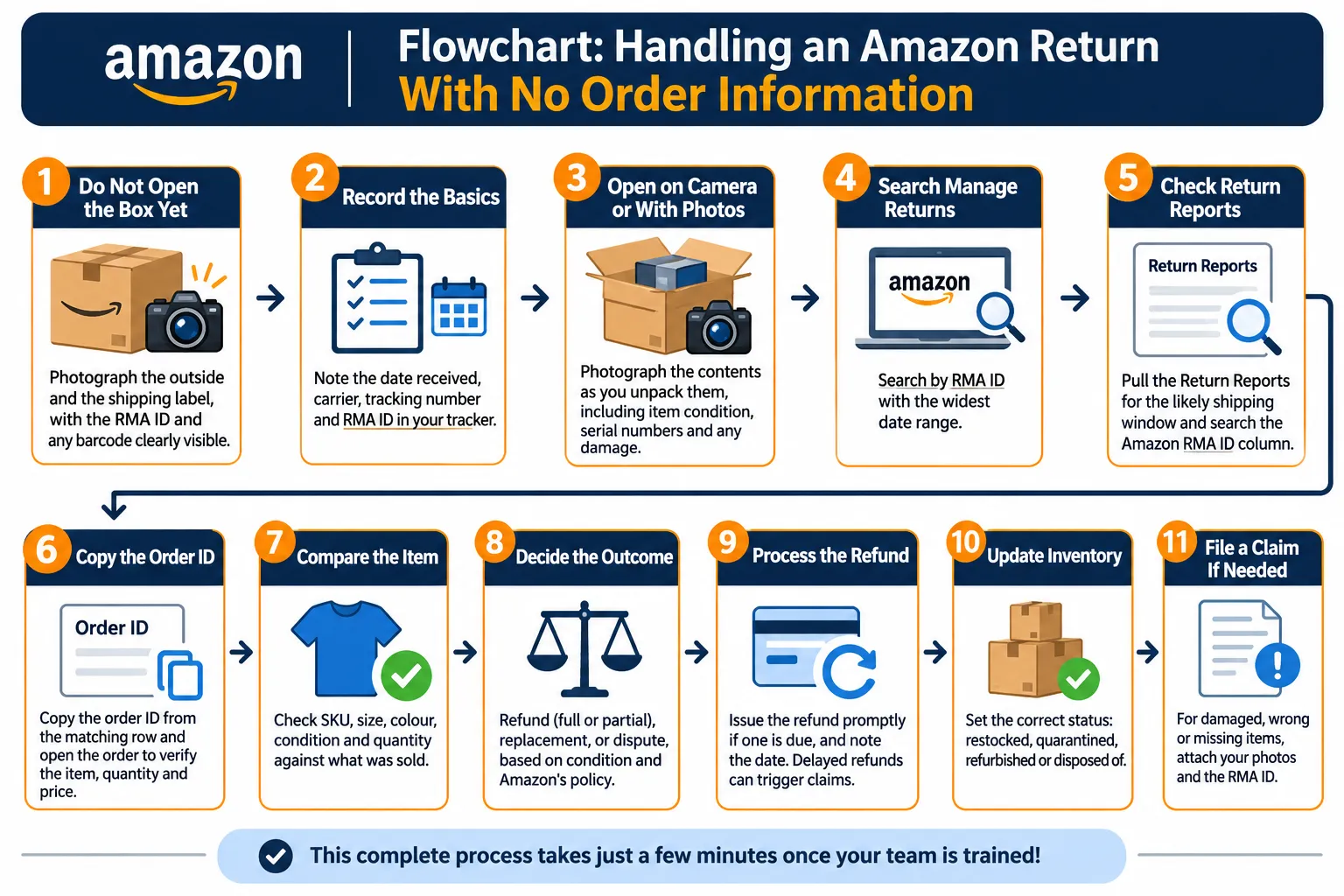
Use this repeatable workflow every time a package arrives without a packing slip. Put it in your SOP and train anyone who opens boxes.
- Do not open the box yet. Photograph the outside and the shipping label, with the RMA ID and any barcode clearly visible.
- Record the basics. Note the date received, carrier, tracking number and RMA ID in your tracker.
- Open on camera or with photos. Photograph the contents as you unpack them, including the item’s condition, serial numbers and any damage.
- Search Manage Returns by RMA ID with the widest date range.
- If that fails, pull the Return Reports for the likely shipping window and search the Amazon RMA ID column.
- Copy the order ID from the matching row and open the order to verify the item, quantity and price.
- Compare the item to the order. Check SKU, size, colour, condition and quantity against what was sold.
- Decide the outcome: refund (full or partial), replacement, or dispute, based on condition and Amazon’s policy.
- Process the refund promptly if one is due, and note the date. Delayed refunds can trigger claims.
- Update inventory with the correct status: restocked, quarantined, refurbished or disposed of.
- File a claim if needed for damaged, wrong or missing items, attaching your photos and the RMA ID.
The whole process should take minutes once your team has done it a few times. The expensive part is not the lookup; it is the days a mystery box spends on a shelf with no owner.
How to Authorize Returns and Create a Custom RMA Number
For seller-fulfilled orders, Amazon automatically authorises most in-policy return requests in the US, but you still have a role in out-of-policy requests, restocking decisions and refunds. The default for Professional sellers has been auto-authorisation, which Amazon generally recommends leaving on.
Reviewing Pending Requests
- Go to Orders > Manage Returns and open the Pending Actions view, where returns awaiting your decision appear.
- Open the request and review the item, reason, buyer comments and any photos.
- Choose to Authorize, Close or Issue a refund, depending on the situation.
- Enter the RMA number. You can use the one Amazon generated or enter a custom number that fits your own system.
- Where permitted, apply a restocking fee for specific return types, and message the buyer if something is unclear.
When a Custom RMA ID Makes Sense
- You use a warehouse management system, 3PL or inventory tool that needs its own return reference.
- You handle policy-exempt or high-value items that you review manually.
- You reconcile returns in bulk for accounting and want a consistent numbering scheme.
- You track replacements for seller-fulfilled orders and need to link the original and replacement shipments.
If you use a custom number, always store the Amazon RMA ID beside it. When you later contact Seller Support or file a SAFE-T claim, the Amazon reference is the one they will recognise.
Return Settings: Auto-Authorization, Prepaid Labels and Returnless Resolutions
Your return settings, usually under Settings > Return Settings or inside Manage Returns, control how much of this happens without you. Three areas matter:
- Auto-authorisation: Amazon approves in-policy requests and generates the label and RMA reference for you.
- Prepaid return labels: For many seller-fulfilled orders Amazon provides or requires a prepaid label, which gives you tracking visibility. Exemptions exist for certain products, so review the current prepaid returns policy.
- Returnless resolutions (“Keep it”): You can set rules so that low-value or specific-reason returns are refunded without the item coming back. This cuts handling cost and removes the risk of receiving unsellable stock, but it means there is no RMA package to reconcile, so check the rules do not apply to products where you need the item back.
Policy details, thresholds and menu names change, so read the current Manage seller-fulfilled returns page in Seller Central before changing settings. If you sell in the US, the Amazon Seller blog also has a useful overview: How to manage Amazon customer returns for seller-fulfilled orders.
Common Amazon RMA ID Problems and How to Fix Them
Most RMA headaches fall into a handful of patterns. Here is how to recognise and resolve each.
1. The Return Arrives With No Order Information
Impact: The return cannot be tied to a customer, so refunds and inventory updates stall. Fix: Follow the mystery-return workflow above: photograph the label, search Manage Returns, then use the Return Reports and match the RMA ID to the order ID.
2. The Customer Sends Back the Wrong or Used Item
Impact: You absorb the loss if you cannot prove what arrived. Fix: Photograph the item beside the label and compare it to the original listing, noting SKU, size, colour and condition. Reference the RMA ID in any claim or message, and keep the evidence for at least as long as the claim window runs.
3. SAFE-T Claims Denied for Missing Details
Impact: A valid claim fails because the evidence is incomplete. Fix: Reference the RMA ID, order ID, tracking details, dates and clear photos in the claim, and read the current SAFE-T claim guidance so you meet the time limits.
4. Refunds Issued Before the Return Arrives
Impact: For some prepaid seller-fulfilled returns, Amazon may refund the buyer when the carrier first scans the package, particularly for lower-value items (sellers have seen a $100 threshold cited, but confirm the current rule). If the box is lost, you can lose the product and the refund. Fix: Track the carrier status for every prepaid return, log the first-scan date, and review whether the return is eligible for reimbursement if it never arrives. Keep the RMA ID and tracking number together.
5. Consolidated Returns With Multiple RMA Labels
Impact: A single bulk shipment may contain returns for several orders, and sometimes for several sellers, which makes matching confusing. Fix: Log every label separately, photograph each one, and match each RMA ID individually before restocking anything.
6. FBA Returns That Never Reach the Warehouse
Impact: The customer is refunded, you pay for it, and the unit never comes back. Fix: Amazon’s policy has been to reimburse when a refunded item is not returned to a fulfillment center within 45 days, usually automatically. Review the FBA Customer Returns and reimbursement reports after that window, and open a case with order IDs and dates for anything missing. Do not assume the system will catch everything.
7. A-to-z Claims Linked to Returns
Impact: If a customer returns an item and does not receive the refund, or you do not honour a valid return, they can file an A-to-z Guarantee claim, and one that is not denied counts against your Order Defect Rate. Fix: Refund promptly after you receive the item, respond to Amazon’s information requests quickly, and keep return evidence on hand. Review Amazon’s A-to-z Guarantee claims policy for current rules. Remember that Amazon expects sellers to keep their Order Defect Rate below 1 percent over a rolling 60-day period.
Best Practices for Managing Amazon RMA IDs
Returns are a permanent feature of ecommerce, so build a system rather than a series of one-off scrambles. These habits are simple and make a measurable difference.
1. Photograph Every Label Before Opening the Package
The label is your proof of which return arrived, when, and in what condition. Capture the RMA ID, tracking number and any barcode before you cut the tape. Missing photo evidence is one of the most common reasons disputes fail.
2. Keep One Central Returns Tracker
A single shared sheet beats scattered notes and screenshots. At minimum, record the fields below, and add more as your volume grows.
| Column | What to record |
| Date received | The day the package physically arrived |
| RMA ID | Exactly as printed on the label and as shown in Seller Central |
| Order ID | The matched purchase, copied from the report or order page |
| Fulfillment type / LPN | FBA or FBM; LPN for FBA units |
| SKU / ASIN and quantity | What was ordered and what actually arrived |
| Return reason | Buyer’s stated reason, plus your own inspection note |
| Condition and disposition | Sellable, damaged, used, wrong item, defective |
| Refund status and date | Amount, date issued, and whether it was before or after receipt |
| Claim status | SAFE-T, reimbursement or A-to-z case number and outcome |
| Evidence link | Folder or link to photos and carrier proof |
3. Monitor Refunds Issued Before Returns Arrive
Create a weekly check for refunds that were issued while the return is still in transit or never scanned. Flag anything open for more than a couple of weeks and follow it to a conclusion: received, reimbursed or claimed.
4. Reconcile Weekly, Not Annually
Pull the Return Reports and, for FBA, the customer returns and reimbursement reports, every week. Compare them with your tracker and your accounting records. Small gaps found in week one are easy to fix. The same gaps found at year-end can be impossible to claim.
5. Standardise the Process and Assign an Owner
Write the mystery-return workflow as a one-page SOP, assign one person to own the tracker, and give a named backup. Most return losses happen in the handoffs between whoever opens the box, whoever issues the refund and whoever does the accounting.
6. Review Return Reasons for Patterns
Every RMA carries a reason. Group them by ASIN each month and look for clusters: “doesn’t fit,” “not as described,” “defective,” “arrived damaged.” Each cluster points to a fix in the listing, the product, the packaging or the supplier.
Preparing for Q4 and Holiday Returns
Returns do not peak when sales peak; they peak weeks later. Amazon has run an extended holiday returns window in past years, allowing most orders placed from November 1 through December 31 to be returned until the end of January. Confirm the current dates and exclusions for your marketplace in Seller Central, because policies can change year to year.
That means the packages arriving in January are often the ones you will be least prepared to handle. A short checklist helps:
- Update your returns SOP and brief anyone who will be handling boxes in December and January.
- Make sure your return address and return settings are current and that labels will reach the right location.
- Stock up on photo-friendly workspace essentials: lighting, a table, a label scanner and storage bins for quarantined units.
- Set a recurring weekly reconciliation slot in your calendar for January and February.
- Review which ASINs had the highest return reasons last year and fix those listings before the rush.
- Check your FBA reimbursement windows so you can claim unreturned refunds on time.
Turn Return Data Into Better Listings and Smarter PPC
Most sellers stop at “find the RMA ID, issue the refund.” The real value is what the return data says about your product and your marketing. Every return reason is a free piece of customer research.
From Return Reasons to Listing Fixes
- “Doesn’t fit” or “wrong size”: Add a size chart, fit notes and a main-image or infographic that shows scale.
- “Not as described”: Rewrite bullets and A+ content so claims match the product; check that images show true colour and materials.
- “Item arrived damaged”: Review packaging, inserts and carrier choice; consider a protective packaging upgrade.
- “Defective” or “stopped working”: Escalate to your supplier, add quality checks and compare return rates by batch.
- “Better price available” or “no longer needed”: Review pricing and promotions, and check whether ads are pulling in the wrong audience.
How Returns Connect to Advertising Performance
Advertising can quietly make a returns problem worse. If a campaign sends shoppers to an ASIN whose listing sets the wrong expectation, you pay for the click, pay again when the order is refunded, and the ASIN builds negative reviews that depress conversion on every future impression. Looking at return rates alongside advertising data helps you decide where to spend and where to fix first.
- Pause or reduce spend on ASINs with consistently high return rates until the listing or product is corrected.
- Tighten targeting on keywords and placements that attract shoppers who then return the item for “not as described” reasons.
- Judge profitability after returns, not just on ACoS or ROAS. A campaign that looks efficient before refunds can be unprofitable once returns are subtracted.
- Use return language in ad copy, bullets and A+ content: if customers keep asking about fit, say so clearly.
This is where returns management and advertising strategy meet. If you want help connecting the two, EcomRanker’s Amazon PPC management service looks at campaign performance together with listing quality and customer feedback so that ad spend goes where it actually produces profitable orders.
Manual Tracking vs Tools vs Outsourcing
How you manage RMA IDs should depend on your return volume, not on habit. Here is a simple way to choose:
| Approach | Best for | Watch out for |
| Manual tracker (Excel or Google Sheets) | Low to moderate volume, one or two people handling returns | Human error and gaps when staff are away; needs a weekly routine |
| Returns or inventory software, or a 3PL’s returns module | Growing volume, multiple SKUs, a warehouse team | Data syncing and setup; still needs someone to review exceptions |
| Outsourced account or returns management | High volume, multi-marketplace brands, no in-house capacity | Needs clear SOPs, reporting and agreed escalation rules |
Whichever route you choose, the principles are the same: capture the RMA ID at the door, match it to the order the same day, track refunds against receipts and review patterns monthly.
How EcomRanker Can Help
EcomRanker is an Amazon-first ecommerce growth agency founded in 2017 by former Amazon professionals, working with sellers across advertising, listing optimisation, A+ content, storefront design and wider marketplace growth. Returns are rarely a standalone problem; they connect to listing accuracy, product quality, ad targeting and account health.
If your returns are climbing, if refunds are not reconciling, or if you suspect your ads are driving the wrong buyers, we can review your account and recommend a practical plan. Start with our Amazon PPC page to see how we approach advertising, or visit the EcomRanker homepage to explore our full set of services and get in touch.
FAQs About Amazon RMA IDs
What is an Amazon RMA ID?
Where do I find the RMA ID in Seller Central?
Is an Amazon RMA ID the same as an order ID?
How do I find the order for a return that arrived with no packing slip?
Why can't I find an RMA ID in Manage Returns?
Do FBA returns have RMA IDs?
Can I create my own RMA number?
What is an LPN and how is it different from an RMA ID?
Does the RMA ID affect my account health or Order Defect Rate?
How long do I have to claim reimbursement for an FBA return that never came back?
Conclusion: Make the RMA ID Work for You
An Amazon RMA ID looks like a small string of characters, but it is the thread that connects a returned box, an order, a refund and a possible claim. Knowing where to search, whether through Manage Returns, the Return Reports or the FBA Customer Returns report, turns a confusing mystery package into a five-minute task.
Build the habits that make this routine: photograph labels, log every return in one tracker, reconcile weekly, watch refunds issued before arrival, and review return reasons for patterns. Do that consistently and you will recover more money, hold cleaner inventory records and protect your account health. Then take the next step and use what returns tell you to improve your listings and your advertising.
Want a second pair of eyes on your returns, listings or ad spend? Talk to the EcomRanker team and let us show you where the profit is leaking.