Amazon is actively auditing its entire catalog for GS1 barcode compliance right now — and a UPC change handled incorrectly can trigger a forced catalog merge that wipes out years of accumulated reviews and sales history on an otherwise healthy listing. The change itself is usually possible. The risk isn’t in whether you can do it — it’s in doing it the wrong way, on the wrong ASIN, without understanding what Amazon does behind the scenes when a barcode changes.
Key Takeaways
- A UPC is one type of GTIN (Global Trade Item Number), the umbrella identifier system — UPC, EAN, and ISBN are all specific GTIN formats, and understanding the difference matters for choosing the right fix.
- Amazon is actively auditing its catalog for GS1 compliance in 2026, and invalid or unverifiable UPCs are being flagged at scale — this isn’t a hypothetical risk, it’s an active enforcement sweep.
- A UPC change can trigger a forced catalog merge, which in the worst cases wipes out accumulated reviews and sales history — the single biggest risk most step-by-step guides understate.
- There are four distinct paths to resolving a UPC issue: direct edit, bulk Flat File update, GTIN exemption, or bypassing UPC entirely through Brand Registry — and picking the wrong one for your situation is a common, costly mistake.
- Cheap, resold UPC codes from third-party resellers are a documented cause of Brand Registry rejection, since the code isn’t registered to your actual brand name in the GS1 database.
UPC, GTIN, EAN, ASIN, FNSKU — What Each One Actually Does
Most confusion around this topic starts with conflating identifiers that serve genuinely different purposes:
| Identifier | What It Identifies | Who Assigns It | Where It’s Used |
| GTIN | The umbrella term for all standardized product identifiers | GS1 (the global standards body) | The general product-ID field required across most marketplaces, not just Amazon |
| UPC | A specific 12-digit GTIN format, most common in North America | GS1, via a licensed prefix | The product identifier Amazon requires when creating most new listings |
| EAN | A 13-digit GTIN format, most common outside North America | GS1 | Same function as UPC, used primarily in European and other international marketplaces |
| ASIN | Amazon’s own internal identifier for a specific catalog listing | Amazon itself, automatically | Used within Amazon exclusively — you cannot create or choose an ASIN yourself |
| FNSKU | A seller- and product-specific barcode for FBA inventory tracking | Amazon, tied to your seller account | Only relevant for FBA inventory; distinguishes your specific stock from other sellers on a shared listing |
The practical distinction that matters most: UPC/EAN/GTIN identify the product itself, universally, across any retailer or marketplace that might sell it. ASIN identifies Amazon’s specific catalog entry for that product. FNSKU identifies your specific physical inventory within Amazon’s fulfillment network. Confusing these is the source of most “which code do I actually need to change” confusion.
Why This Matters More in 2026: Amazon’s Active GS1 Compliance Audit
This is the detail most procedural “how to change a UPC” content treats as a footnote, when it should be the headline: Amazon is actively running machine-learning-driven audits of its entire catalog to verify UPCs against the GS1 database in real time, not on a periodic or reactive basis. An invalid, unregistered, or mismatched UPC isn’t a dormant risk waiting to be discovered someday — it’s being actively flagged now, at scale, across the platform. The consequences when a mismatch is caught can include:
- A+ Content and Brand Story rejection, since Amazon uses the UPC/GTIN to verify you’re the legitimate brand owner
- A forced catalog merge into a different ASIN, which can happen with little warning
- In the more severe cases, a merge that wipes out accumulated reviews and sales history — the actual asset value of a listing that’s been live and performing for months or years
- Listing suppression, halting sales on that ASIN immediately, independent of how well it was otherwise performing
This is why the framing of this entire topic matters: a UPC change is not a routine data-entry task. It’s a change to the identifier Amazon uses to verify authenticity and ownership, and getting it wrong on an established, high-performing ASIN carries real, sometimes irreversible downside.
Why You Might Need to Change a UPC
- The original UPC was entered incorrectly at listing creation and needs correction
- You’re switching from a resold or third-party UPC to a properly registered GS1 code, often to resolve a Brand Registry mismatch
- A packaging or product change significant enough that GS1’s own standards require a new identifier
- You acquired a product line or brand and need to transition identifiers to your own registered codes
- Amazon flagged an existing UPC as invalid during a compliance sweep and requires correction to keep the listing active
Before You Touch Anything: What Actually Happens Behind the Scenes
When you change a UPC, Amazon doesn’t simply overwrite a field — it re-evaluates whether the new identifier matches an existing catalog entry. If it does, Amazon may merge your listing into that existing ASIN rather than keeping yours intact. This merge is usually harmless when done deliberately (correcting your own ASIN’s mismatched information onto the right one), but it’s the mechanism behind the worst-case scenario: if the merge target is the wrong ASIN, or if Amazon’s system misidentifies the correct match, the result can be a genuinely damaging, hard-to-reverse mix-up. This is why documentation and precision matter more here than in most routine catalog updates — verify the exact correct GTIN before submitting any change, and never guess.
Pre-Change Checklist
Run through this before submitting any UPC change, regardless of which method you use:
- ☐ Verify the new GTIN directly against GS1’s own database, not just the number on a supplier invoice
- ☐ Confirm the GTIN is registered to your actual brand/company name, not a reseller
- ☐ Screenshot your current listing (images, reviews count, rank) as a before-state record in case you need to reference it in a support case later
- ☐ Confirm whether the target ASIN already exists in Amazon’s catalog under the new GTIN — search for it directly before submitting
- ☐ If the listing has significant sales history, consider testing the change on a lower-stakes SKU first if you’re managing multiple similar corrections
- ☐ Have your GS1 certificate and Brand Registry documentation readily accessible in case Seller Support requests it
Tips to Improve Your Approval Odds
- Submit clean, exact data. Extra spaces, incorrect digit counts, or a GTIN that doesn’t match GS1’s formatting exactly are common, entirely avoidable rejection triggers.
- Match your Brand Registry name precisely. Even small discrepancies between your registered brand name and the name associated with the GTIN can trigger a manual review or rejection.
- Submit during lower-volume periods where possible. Avoid initiating catalog changes immediately before major sales events, since a processing delay or unexpected merge is far more costly to untangle during peak traffic than during a quiet period.
- Keep supporting documentation ready before you submit, not after a rejection — a GS1 certificate and Brand Registry proof attached proactively can shorten back-and-forth if Seller Support has questions.
- Don’t submit the same rejected request unchanged. If a change is rejected, address the specific stated reason directly rather than resubmitting identical information and hoping for a different outcome.
- When in doubt on a high-value listing, get expert review first. The cost of a professional catalog review is small compared to the cost of an unwound merge on an ASIN with real sales history.
Method 1: Direct Edit Through Seller Central
The fastest method when Amazon allows it directly:
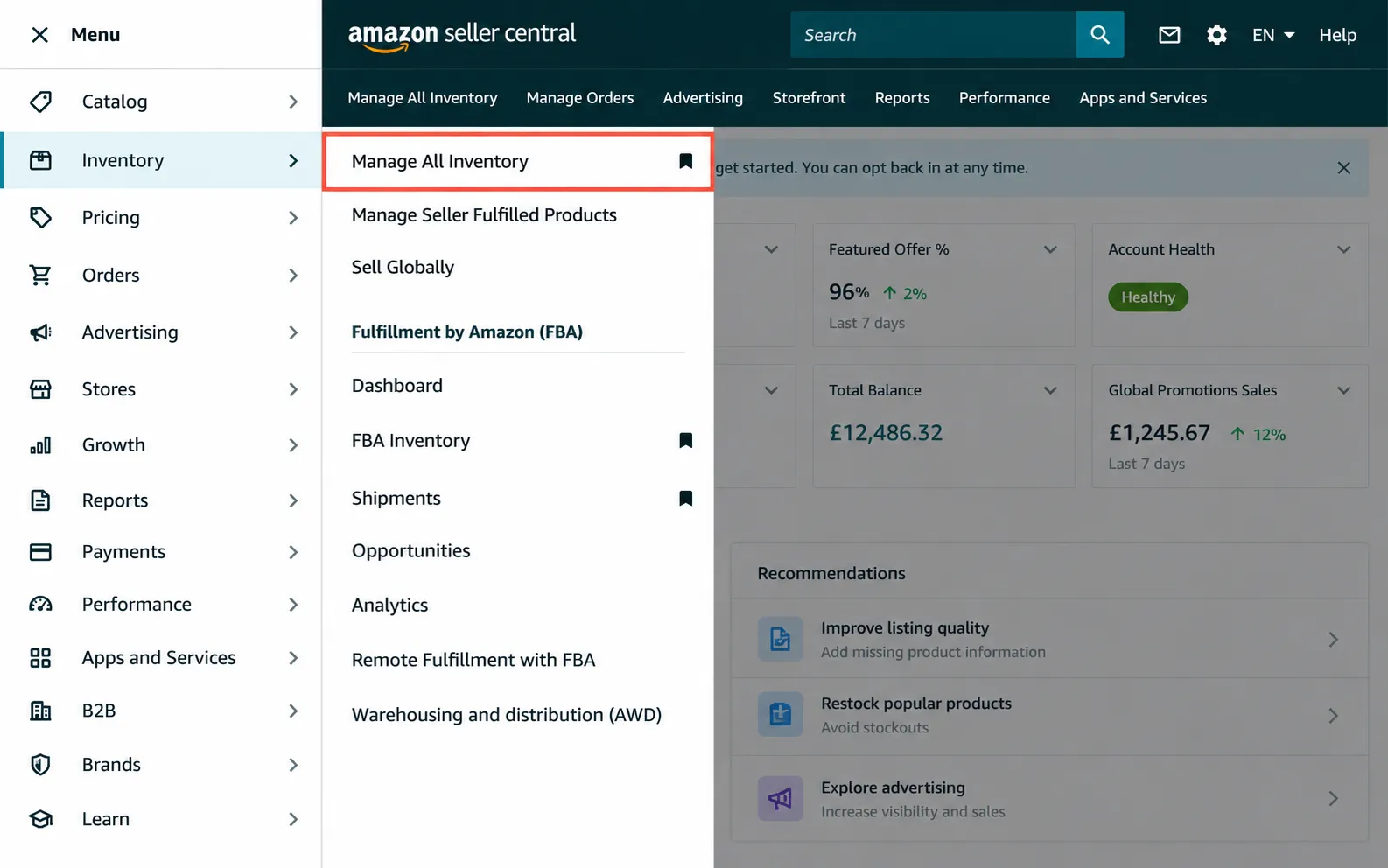
- Log in to Seller Central and navigate to Manage All Inventory.
- Locate the specific product you need to edit and select Edit.
- Find the Product ID / GTIN field under the relevant listing details section.
- Enter the new, verified UPC exactly as issued by GS1 — no extra spaces, no formatting errors.
- Submit the change and monitor the listing over the following days to confirm it processed correctly rather than triggering an unexpected merge or suppression.
This method works for straightforward corrections but isn’t always available — Amazon restricts direct UPC edits in certain circumstances, particularly for established listings with significant sales history, which is where the other methods below become necessary.
Method 2: Flat File Update (Bulk Changes)
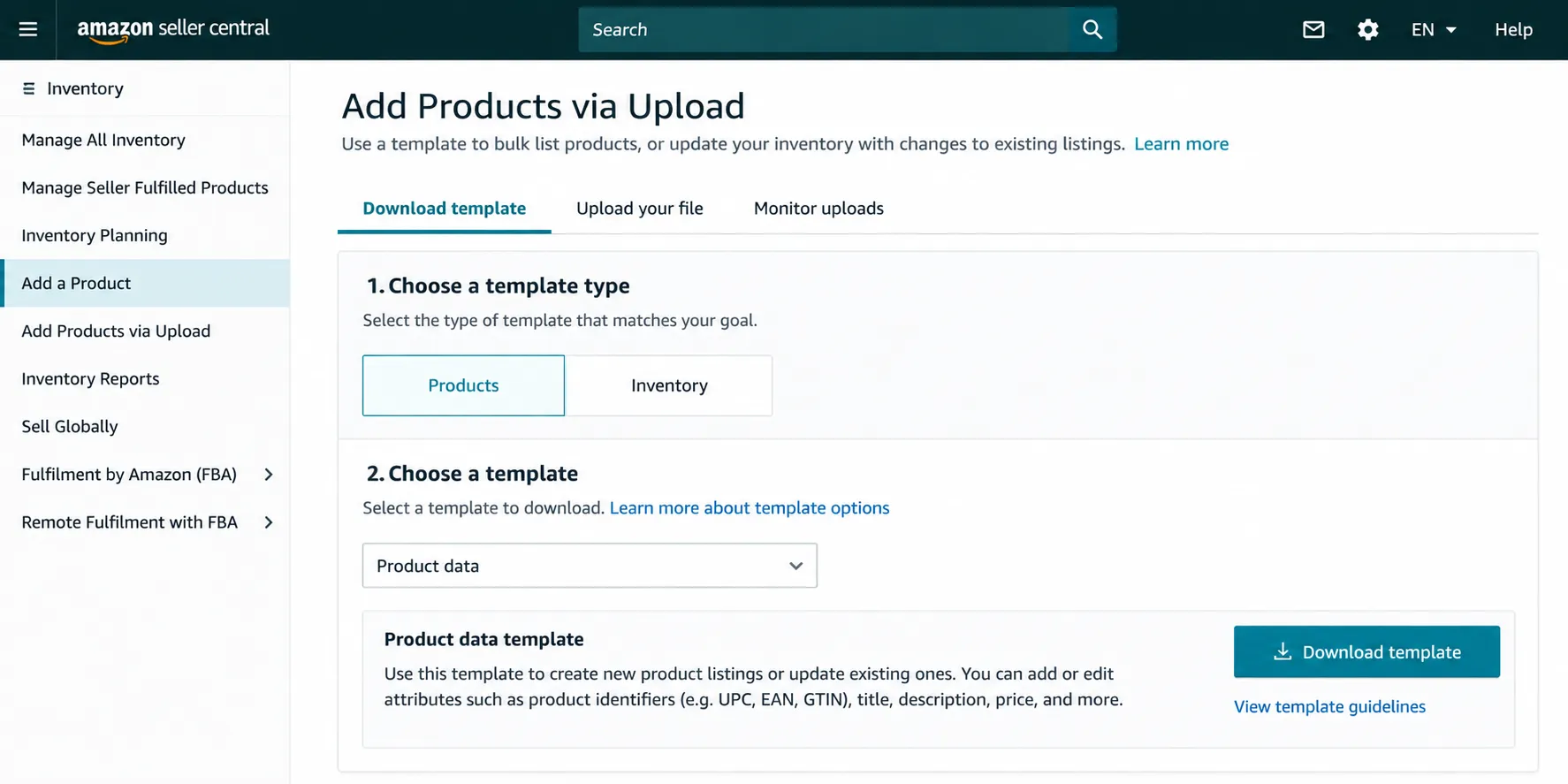
For sellers needing to update UPCs across multiple listings simultaneously, a Flat File Update — a structured spreadsheet template submitted through Seller Central — allows bulk changes rather than editing listings one at a time. This method gives more direct control over the update process but also carries more risk if the file contains errors across multiple SKUs at once, since a formatting mistake can propagate across your entire batch rather than affecting a single listing. Double-check every row against your verified GS1 data before submission, and consider testing with a small batch before running a full catalog update.
Method 3: Requesting a GTIN Exemption
If your product genuinely doesn’t have a manufacturer-issued barcode — common for private label products early in development, or handmade/artisanal goods — you can apply for a GTIN exemption rather than needing a UPC at all:
- Go to Add a Product in Seller Central and search for your product to confirm it doesn’t already exist in Amazon’s catalog.
- Check the box indicating “I don’t have a product ID.”
- If eligible, you’ll see an option to apply for a GTIN exemption.
- Provide the required documentation — typically real photos of the product and packaging showing the brand name (mockups or digital renders are not accepted), plus the correct category and exact brand name.
This path is specifically useful for genuinely new products without an existing barcode, not as a workaround for products that already have one and need correction.
Method 4: Bypassing UPC Entirely With Brand Registry
This is a genuinely underused option most UPC-change guides don’t mention: if you’re enrolled in Amazon Brand Registry, you may not need to deal with UPC as your listing’s key identifying attribute at all. Sellers can contact Seller Support specifically to request changing their key attribute away from UPC, provided Brand Registry ownership is confirmed. This sidesteps the entire UPC-change problem for future listing management, since your brand ownership — not a barcode match — becomes the verification mechanism.
| Method | Speed | Risk Level | Best For |
| Direct Edit | Fastest, when available | Low, for straightforward corrections | Simple, verified corrections on a single listing |
| Flat File Update | Moderate | Moderate — errors can propagate across a batch | Bulk changes across many SKUs |
| GTIN Exemption | Slower, requires documentation review | Low | Genuinely new products with no existing barcode |
| Brand Registry Key Attribute Change | Requires Seller Support coordination | Low, once approved | Brand-registered sellers wanting to avoid UPC dependency going forward |
The Cheap UPC Trap
A specific, common mistake worth flagging directly: purchasing a “GS1-registered” UPC from a discount reseller rather than licensing it directly from GS1 or your brand’s actual registered prefix. These codes are often technically valid in the GS1 database, but registered to the reseller’s company, not yours — a mismatch that frequently causes Brand Registry applications to fail, since Amazon checks whether the code owner matches your seller/brand name. If your Brand Registry application was rejected citing a code ownership mismatch, this is almost certainly why. The fix is licensing your own GTIN prefix directly from GS1 (single barcodes are available at a modest cost for smaller sellers) rather than continuing to rely on a resold code that will keep causing verification problems.
If Amazon Rejects Your Change
Rejections typically cite one of a few specific reasons. Match the fix to the actual stated reason rather than guessing:
| Rejection Reason | Fix |
| GTIN doesn’t validate against GS1’s database | Re-verify the exact code directly with GS1; check for typos or formatting errors before resubmitting |
| Brand name mismatch | Confirm your Brand Registry name matches exactly what’s associated with the GTIN in GS1’s records |
| Flagged as a potential listing hijack attempt | Escalate through Seller Support with GS1 certificate and Brand Registry documentation attached, explaining the legitimate business reason for the change |
| Code registered to a different company | This is the cheap-reseller-UPC problem covered above — the fix is licensing your own GTIN directly from GS1, not resubmitting the same third-party code |
If you believe a rejection is a genuine platform error rather than a real data issue, escalate through Seller Support with full documentation attached rather than resubmitting the identical request and hoping for a different automated outcome.
Does This Affect Other Marketplaces?
Yes, with a caveat worth knowing: a UPC is a universal identifier, so updating it in the US marketplace generally propagates to other marketplaces using the same product data — but this update can take time to fully reflect across regions, and isn’t necessarily instantaneous. If you’re managing listings across US, UK, and other marketplaces, don’t assume a US-side UPC correction has immediately resolved a related issue on a different marketplace; verify each region separately rather than assuming automatic, simultaneous propagation.
How EcomRanker Handles Catalog and Barcode Issues
We treat UPC and GTIN corrections as a precision task with real downside risk, not a routine data-entry fix — verifying the correct target identifier against GS1 records before any change is submitted, and monitoring the listing closely afterward to catch an unexpected merge or suppression before it compounds. This connects to our broader Amazon account audit work, since catalog compliance issues are exactly the kind of quiet risk that can escalate into a suppressed ASIN if left unaddressed during Amazon’s active compliance sweeps.
Dealing with a flagged UPC or Brand Registry mismatch and want it corrected without risking your listing history? Get in touch for a catalog compliance review.
Frequently Asked Questions
1 . What is the difference between a UPC and a GTIN?
GTIN (Global Trade Item Number) is the umbrella term for all standardized product identifiers. UPC is a specific 12-digit GTIN format most common in North America; EAN and ISBN are other GTIN formats used in different contexts.
2 . Can changing a UPC on Amazon delete my listing?
Not directly, but it can trigger a catalog merge into a different ASIN if the new UPC matches an existing listing, which in worst-case scenarios can affect accumulated reviews and sales history. This is why verifying the correct identifier before submitting any change matters so much.
3 . Why is Amazon flagging my UPC as invalid?
Common reasons include the code not matching GS1’s database, being registered to a different company than your seller account, or being a resold/third-party code not properly licensed to your brand.
4 . What is a GTIN exemption and when should I use it?
A GTIN exemption lets you list a product without a UPC when the manufacturer genuinely doesn’t provide one — common for new private label or handmade products. It’s not intended as a workaround for products that already have an existing, correctable barcode.
5 . Can I avoid dealing with UPCs entirely?
If you’re enrolled in Brand Registry, you can request that Amazon change your listing’s key attribute away from UPC through Seller Support, using brand ownership rather than a barcode match as the verification mechanism going forward.
6 . Why did my Brand Registry application get rejected over my UPC?
This commonly happens when the UPC was purchased from a discount reseller and is registered to that reseller’s company in the GS1 database, not to your actual brand — a mismatch Amazon checks for directly.
7 . How long does a UPC change take to process on Amazon?
It varies by method and case complexity, commonly ranging from several days to over a month for more involved corrections, particularly those requiring Brand Registry verification.
8 . Will a UPC change on Amazon US affect my UK or EU listings?
Generally yes, since UPCs are universal identifiers, but the update can take time to fully propagate across marketplaces — verify each region separately rather than assuming immediate, simultaneous updates.
9 . What documents do I need for a GTIN exemption request?
Real photographs (not mockups or digital renders) of the actual product and packaging showing the brand name, along with accurate category and brand information matching your Seller Central account.
10 . Is it safe to buy a cheap UPC code from a third-party reseller?
Generally not recommended. While these codes may be technically valid in the GS1 database, they’re typically registered to the reseller’s company rather than yours, which frequently causes Brand Registry rejection and ongoing verification problems.
11 . What should I do if a UPC change causes an unexpected listing merge?
Contact Seller Support immediately with your GS1 documentation and details of the original listing, since catching and correcting a bad merge quickly is significantly easier than untangling one that’s been left unaddressed for weeks.