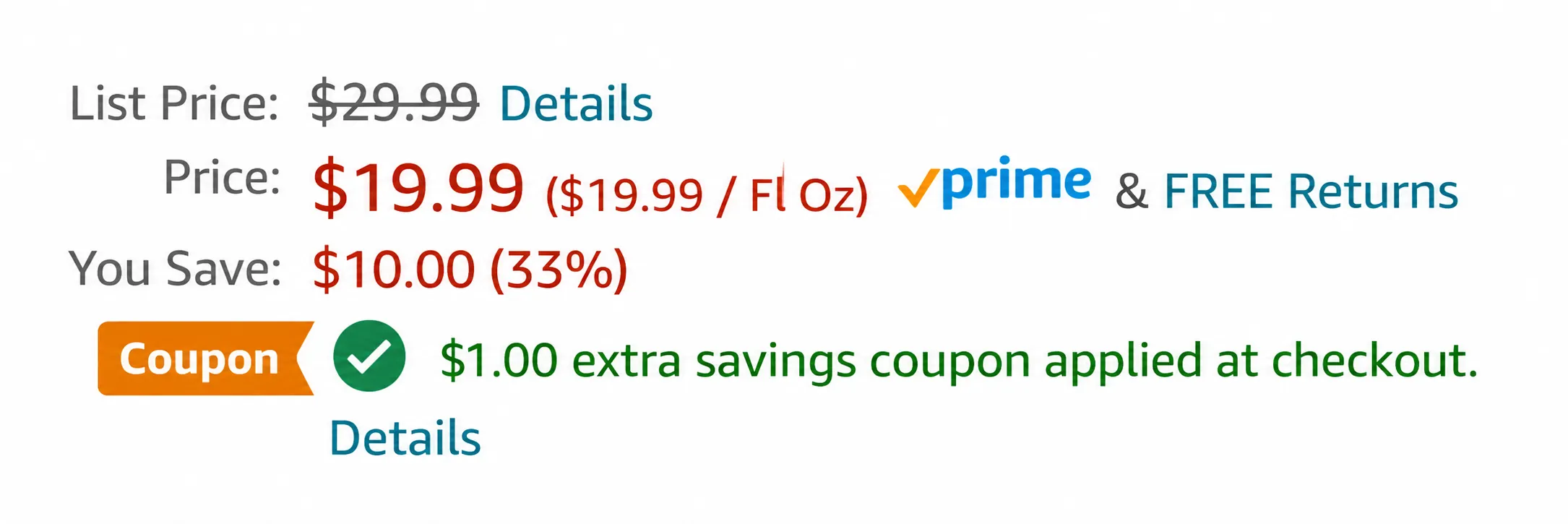
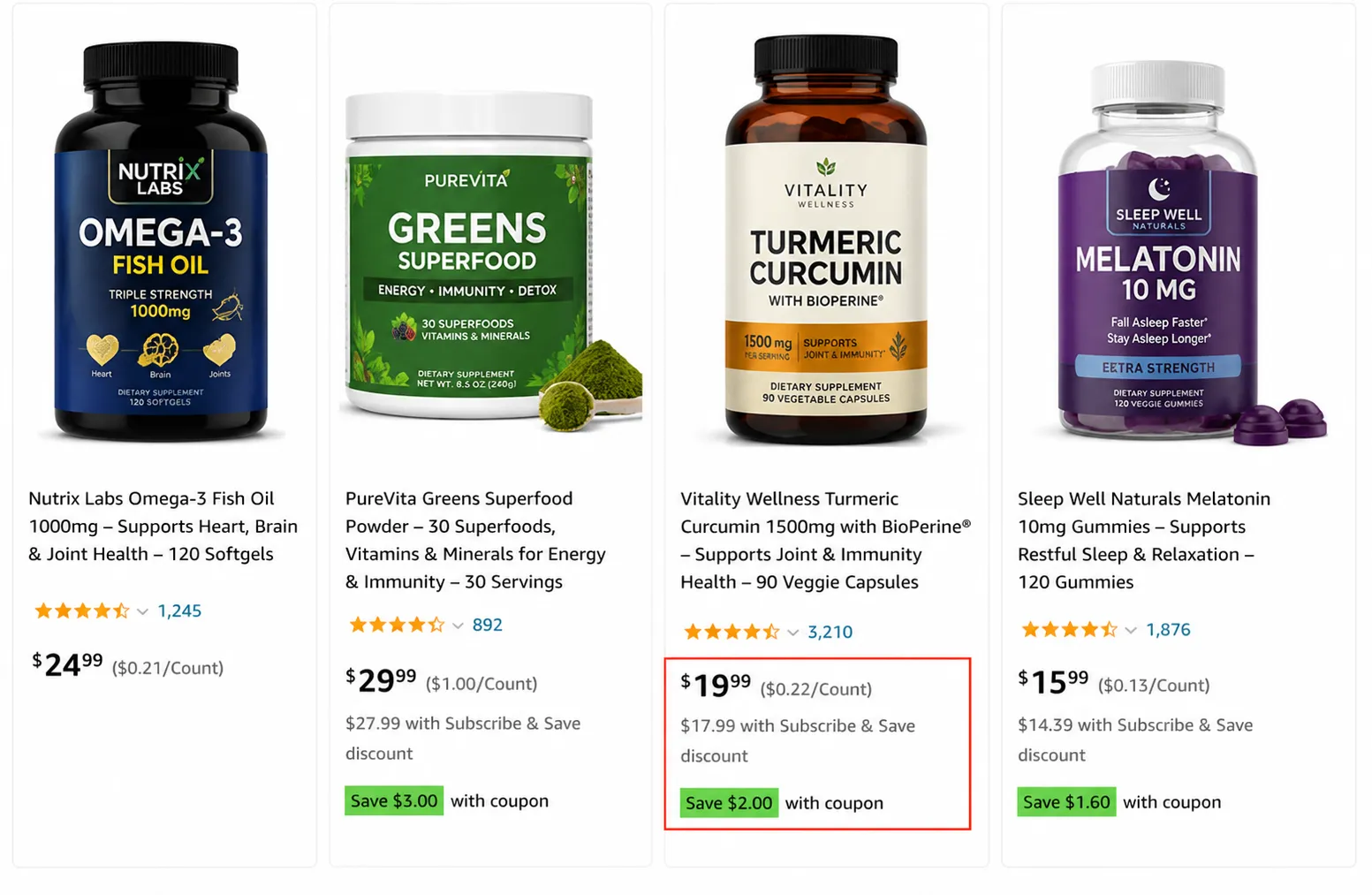
Amazon coupons are seller-funded digital discounts that appear as a green badge on search results and product pages. A shopper clicks “clip coupon,” and the discount comes off automatically at checkout. As a seller, you set the discount, the budget, the dates and the audience in Seller Central, and Amazon charges a $5 fee per coupon plus 2.5% of the sales the coupon brings in.
That is the short version. The longer version is where sellers win or lose money.
Most guides on how Amazon coupons work were written before Amazon changed coupon fees in June 2025. Many still quote the old $0.60 per-redemption fee, the old 80% discount limit, and setup steps from the old Seller Central menu. If you build your coupon budget on those numbers, your profit math will be wrong.
We manage coupons every week for brands across Amazon US, UK, UAE and India. This guide explains exactly how coupons on Amazon work today, what they really cost, and how to run them so they make money instead of just moving units.
What Are Amazon Coupons?
An Amazon coupon is a time-limited discount that a seller attaches to one product or a group of products. It shows as a green (sometimes orange) badge under the price, such as “Save 15%” or “Save $5 with coupon.”
Three things make Amazon coupons different from coupons in a shop:
- They are fully digital. There is nothing to print or type. The shopper clicks a box and the coupon is saved to their account.
- The seller pays for them. Amazon provides the tool, but every dollar of discount comes out of your margin, plus Amazon’s coupon fee.
- They are discoverable. Coupons appear in search results, on the product page, in the cart and on the Amazon coupon page, so they act as both a discount and a visibility boost.
Coupons are not the same as promo codes, Lightning Deals or Prime Exclusive Discounts. We compare all of them later in this guide, because choosing the wrong tool is one of the most expensive mistakes we see.
How Do Amazon Coupons Work for Shoppers?
For shoppers, the process takes about two seconds:
- They see a green coupon badge in search results, on a product page, or on the Amazon coupon page.
- They tick the “Apply coupon” or “Clip coupon” box.
- The coupon is saved to their account. The listed price does not change yet.
- They add the item to the cart and go to checkout.
- The discount is taken off automatically, and the saving shows in the order summary.
If the shopper forgets to clip the coupon before checking out, they do not get the discount. Most coupons can be used once per customer. When the seller’s budget runs out or the end date passes, the badge disappears, even if shoppers were still looking at it the same day.
How Do Amazon Coupons Work for Sellers?
On the seller side, a coupon is a small promotional campaign that you fund and control. Here is what happens behind the green badge:
- You choose the products. Select one ASIN for a focused test, or a group of ASINs for a catalog-wide offer.
- You set the discount. Choose percentage-off or money-off, within Amazon’s allowed range.
- You set a budget. This caps your total spend on the campaign. When it is used up, Amazon stops showing the coupon.
- You pick the audience. Show it to all shoppers or to a narrower group, such as Prime members.
- You set the dates. Coupons run for a fixed window and then expire.
- Amazon checks it. Before it goes live, Amazon reviews the coupon against its pricing rules, such as the Was Price check. If an ASIN fails, the coupon is suppressed for that product.
- Amazon charges you. You pay the $5 creation fee, plus 2.5% of the coupon-driven sales, plus the discount itself on every unit sold.
The key point most sellers miss: a coupon does not create demand by itself. It makes your existing traffic convert better and gives you extra visibility. If your listing has weak images or a low star rating, a coupon will mostly cost you money.
Who Can Use Amazon Coupons? (Eligibility Rules for 2026)
Not every seller or product qualifies. Before you plan a coupon budget, check these rules:
- Seller account: you need a Professional selling plan and an overall rating of at least 3.5 stars, according to Amazon’s guide to seller promotions.
- Product condition: coupons are for eligible items in new condition. FBA and seller-fulfilled products both qualify.
- Discount range: the discount must be between 5% and 50% of the current price. Older guides that say 80% are out of date.
- The Was Price check: your coupon price must sit clearly below the product’s reference price (the “Was Price” or recent lowest price). If you raised your price just before launching the coupon, Amazon may suppress it.
- New products: ASINs with little or no sales history can still run coupons. Amazon opened this up so new launches can build early sales momentum.
When you create a coupon, Seller Central flags any ineligible ASINs and tells you which rule they fail. Fix that first, rather than lowering your price at random.
Amazon Coupon Fees in 2026: What Coupons Really Cost
This is the section most competitor guides get wrong. On June 2, 2025, Amazon replaced the old $0.60 per-unit coupon fee with a new two-part fee: a $5 upfront fee per coupon plus 2.5% of coupon sales.
So every coupon now has three costs:
- The $5 creation fee, charged once per coupon, not per unit.
- The 2.5% variable fee, charged on the sales that the coupon generates.
- The discount itself, which you fund on every unit sold with the coupon.
The formula is simple:
Total coupon fee = $5 + (2.5% × coupon sales)
Who pays more now? It depends on your price. Here is the fee for 100 redemptions of a 10% coupon at three price points:
| List price | Coupon sales (100 units) | Old fee ($0.60 × 100) | New fee ($5 + 2.5%) | Change |
| $15 | $1,350 | $60.00 | $38.75 | Cheaper |
| $30 | $2,700 | $60.00 | $72.50 | About 21% more |
| $60 | $5,400 | $60.00 | $140.00 | More than double |
The tipping point is roughly $24. Below that price, the new fee is usually cheaper per unit. Above it, coupons cost more than they used to, and the gap grows fast on premium products. Some industry sources also report a cap on the variable fee; check the fee preview in Seller Central before you launch, because Amazon adjusts promotion fees by marketplace and over time.
You can see the coupon fees you have paid in Seller Central under Payments → Transaction View, in the service fees.
Real Profit Math: Is Your Coupon Worth Running?
A coupon only makes sense if the extra sales are worth more than the discount and fees. Here is a worked example for a $30 product with a 10% coupon and 200 redemptions:
| Per unit | Without coupon | With 10% coupon |
| Selling price | $30.00 | $27.00 |
| Product cost | $8.00 | $8.00 |
| Amazon referral fee (15%) | $4.50 | $4.05 |
| FBA fulfillment fee | $5.50 | $5.50 |
| PPC cost per unit | $4.00 | $4.00 |
| Coupon fee ($140 ÷ 200 units) | $0.00 | $0.70 |
| Profit per unit | $8.00 | $4.75 |
The coupon fee here is $5 + 2.5% of $5,400 (200 × $27) = $140.
Your profit per unit falls by $3.25. So the coupon only pays off if it brings enough extra sales, better ranking, or new reviews to cover that gap. In this example, if you would have sold 120 units without the coupon, you need the coupon to push you past about 202 units in the same period just to break even on profit. Run this math with your own numbers before every campaign.
Tip: Product cost, FBA fee and PPC cost above are example figures. Use our Amazon ACoS calculator to get your real advertising cost per unit.
How to Set Your Coupon Budget
Your coupon budget is the most you are willing to spend on discounts in one campaign. When the budget is nearly used up, Amazon stops showing the coupon, so you will not overspend.
When planning the budget, think beyond the discount:
- Discount cost: the discount × the number of redemptions you expect.
- Coupon fees: $5 + 2.5% of coupon sales.
- Advertising: a coupon works best with PPC traffic behind it.
- Inventory: a successful coupon can sell out a product. Running out of stock hurts your ranking more than the coupon helped it.
- Fulfillment and storage: more units sold means more FBA fees.
Match the budget to the goal. If you are testing whether coupons help a new product get reviews, start small, for example 50 redemptions. If you are clearing old stock before a relaunch, size the budget to the units you need to move.
How to Create a Coupon on Amazon (Step by Step)
Amazon moved coupons in the new Seller Central layout. Many guides still say “go to the Advertising tab,” which is the old path. Here is the current one:
- Log in to Seller Central and open Marketing → Manage promotions and deals → Manage coupons. (On older layouts, it is Advertising → Coupons. You can also type “Coupons” in the search bar.)
- Click Create a new coupon.
- Search for the ASINs you want and click Add to coupon. You can exclude specific variations if you do not want them discounted, such as a best-seller that already converts well.
- Choose Money off or Percentage off, and enter a discount between 5% and 50%.
- Choose whether to limit the coupon to one redemption per customer. For most sellers, this is the safer choice.
- Enter your budget.
- Write your coupon title. Amazon shows it to shoppers, so keep it clear, for example “Save 15% on Bamboo Cutting Board Set.”
- Choose your target customers: all customers or a specific group.
- Set the start and end dates.
- Review everything and click Submit.
After submitting, check the Manage coupons dashboard. If a coupon shows as “Needs action” or suppressed, open it to see which rule it failed. Most coupons go live within a few hours. Plan major events like Prime Day or Black Friday days ahead, because coupons lock before they start and you cannot change the discount once they are running.
For a full tour of the new layout, read our guide to the new Amazon Seller Central interface.
Dollar-Off vs Percentage-Off Coupons: Which Converts Better?
Amazon lets you show your discount as money off (“Save $5”) or percentage off (“Save 20%”). The discount can be identical, but shoppers read them differently.
A simple rule we use with clients:
- Under about $25: percentage-off usually looks bigger. “Save 20%” sounds better than “Save $4” on a $20 product.
- Over about $100: dollar-off usually looks bigger. “Save $25” sounds better than “Save 10%” on a $250 product.
- In between: test both. Dollar-off has one clear advantage at any price: the shopper does not have to do any math.
Also look at what competitors on page one are showing. If every rival shows “Save 15%,” a matching format makes comparison easy. If you cannot match their discount, switching to the other format can help you stand out instead.
Amazon Coupon Targeting: Who Should See Your Coupon?
Targeting decides who sees your coupon, and it has a big effect on ROI. Depending on your marketplace and account, the options in Seller Central can include:
- All customers: the widest reach. Best for launches and clearing stock.
- Prime members: good for products where fast shipping matters and for Prime event periods.
- Specific customer groups: such as Amazon Business buyers or other segments Amazon offers in your account.
Narrow targeting means fewer redemptions but a better chance that the people who use the coupon are the right buyers. Broad targeting is better when your goal is visibility and sales velocity.
Amazon Coupons vs Promo Codes vs Deals vs Prime Exclusive Discounts
Amazon gives sellers several discount tools. Using the wrong one wastes budget.
| Tool | How the shopper gets it | Visible on Amazon? | Fee (US) | Best for |
| Coupon | Clicks “clip coupon” | Yes, green badge in search and on listing | $5 + 2.5% of coupon sales | Everyday conversion boost, launches |
| Promo code (Amazon promo code) | Types a code at checkout | No, unless you make it public | No promotion fee | Email lists, influencers, external traffic |
| Lightning Deal / Best Deal | Shown in Today’s Deals for a set time | Yes, high visibility | $70 per day + 1% of deal sales (variable fee capped at $2,000) | Short bursts, Prime Day, Black Friday |
| Prime Exclusive Discount | Prime members see a strike-through price | Yes | $100 per campaign | Prime event pricing |
Deal and Prime Exclusive Discount fees come from Amazon’s June 2025 fee update.
In short: use coupons for steady, visible discounts; use promo codes when you are sending traffic from outside Amazon; and use Lightning Deals when you want a big, short spike in traffic.
Can You Stack Amazon Coupons With Other Discounts?
Often, yes, and this is where sellers lose money without noticing. A coupon can combine with other active offers on the same product, such as a Lightning Deal, a Prime Exclusive Discount or a Subscribe & Save discount.
For example, a 15% Lightning Deal plus a 10% coupon can give a shopper about 25% off, and you pay the fees for both tools. Before a big event, list every promotion running on each ASIN and calculate the combined discount. If the total is more than your margin can handle, pause the coupon for the event window.
When Do Amazon Coupons Expire?
Every coupon has an end date that you set. It can also end early if the budget runs out. Most shoppers never see the end date, so the badge simply disappears. For sellers, this means:
- Set end dates that match your goal, such as the end of a launch period or a sale event.
- Extend or top up a coupon that is working rather than starting a new one, which also avoids paying another $5 creation fee.
- Keep an eye on budget pacing during busy periods. A coupon can burn through its budget in hours on Prime Day.
6 Strategies to Get a Better ROI From Amazon Coupons
1. Fix the listing first. A coupon multiplies your existing conversion rate. If your main image, title or reviews are weak, more clicks will not turn into sales. Start with listing optimization before you spend on discounts.
2. Pair coupons with PPC. The green badge also shows on Sponsored Products ads, which can lift click-through rate on paid traffic. Running a coupon without ads usually limits results. See how we structure campaigns in our Amazon PPC management guide.
3. Use coupons in the launch window. New products need early sales and reviews. A modest coupon during the first weeks helps build the sales velocity that feeds organic rankings. Read more in our Amazon product launch strategy.
4. Beat competitors’ everyday price, not just your own. A coupon is most effective when your final price lands below several competitors on page one. Check their prices and coupons before you choose your discount.
5. Use coupons to move slow stock. Aging inventory that is close to long-term storage fees is a good candidate for a short, deeper coupon instead of a permanent price cut.
6. Promote coupons outside Amazon. Share coupon offers through email, social media and deal sites to reach shoppers who would never have found your listing in search.
How to A/B Test Amazon Coupons
Amazon does not offer a built-in split test for coupons, so you need to test manually:
- Change one thing at a time: discount size, dollar vs percentage, targeting, or duration.
- Keep the budget and length the same for each test.
- Avoid seasonal overlap. Do not compare a coupon run in early December with one run in February.
- Judge by profit, not clicks. The winner is the version with the best net profit per unit and total units, not the most clips.
Because the tests do not run at the same time, only trust large differences. Small changes are usually just timing.
Common Amazon Coupon Mistakes
- Using old fee numbers ($0.60 per unit) in your profit math.
- Raising the price just before adding a coupon, which can trigger the Was Price check and suppress it.
- Running coupons non-stop, which trains repeat buyers to wait for a discount.
- Forgetting that coupons stack with deals, then selling at a loss during events.
- Launching a coupon on a product with low stock and running out.
- Not tracking results, so a losing coupon keeps running for weeks.
Metrics to Track During a Coupon Campaign
| Metric | What it tells you |
| Units sold vs baseline | Whether the coupon actually created extra sales |
| Conversion rate | Whether more visitors are buying |
| Clip-to-redeem rate | How many shoppers who clip the coupon actually buy |
| Net profit per unit | Profit after the discount, the coupon fee and ad cost |
| Organic rank for main keywords | Whether the extra sales are improving your ranking |
| TACoS | Whether your total ad spend share is falling as organic sales grow |
Use our TACoS calculator to track the last one.
Why Is My Amazon Coupon Not Showing?
If your coupon has disappeared or never appeared, check these in order:
- Budget used up: the coupon stops when you approach your budget.
- End date passed: check the dates in Manage coupons.
- Price rule failed: your current price is not far enough below the Was Price or recent lowest price.
- Product ineligible: low rating, inactive listing, or the product is out of stock.
- Still in review: new coupons can take a few hours to go live.
Final Thoughts: Making Amazon Coupons Work for You
Amazon coupons are simple for shoppers: clip, check out, save. For sellers, they are a real marketing cost that needs a plan. Since June 2025, every coupon costs $5 plus 2.5% of its sales on top of the discount, so higher-priced products need especially careful math.
The sellers who profit from coupons do three things. They fix the listing before they discount. They run the numbers with current fees. And they pair coupons with PPC and SEO, so the extra sales lead to better organic ranking long after the coupon ends. That is the same system behind the Amazon flywheel.
If you want a second opinion on your coupon and promotion strategy, our team can review it as part of a free Amazon ASIN audit.